


Eisenhower Matrix Template
Use a reusable Eisenhower Matrix to sort tasks by urgency and importance so you can focus on what matters most and spend less time deciding what to do next.
Sign up to create your own template.
Eisenhower Matrix Template
Use a reusable Eisenhower Matrix to sort tasks by urgency and importance so you can focus on what matters most and spend less time deciding what to do next.
Use templateSign up to create your own template.
INTEGRATED FEATURES
Recommended apps




Summary
It's normal not to get everything done, and that's perfectly fine. Success comes from knowing how to prioritize, not from finishing every task. With good prioritization methods, you can focus on the most important tasks first, plan the rest for later, and delegate or remove what you don't need.
This way, you still accomplish what matters most without exhausting yourself.
An Eisenhower Matrix template helps you manage your time more easily. You can use it daily, weekly, or whenever your to-do list feels overwhelming. In this article, you'll find out what the Eisenhower Matrix is, why it's helpful, and how to set up a digital template to save time.

What is an Eisenhower Matrix?
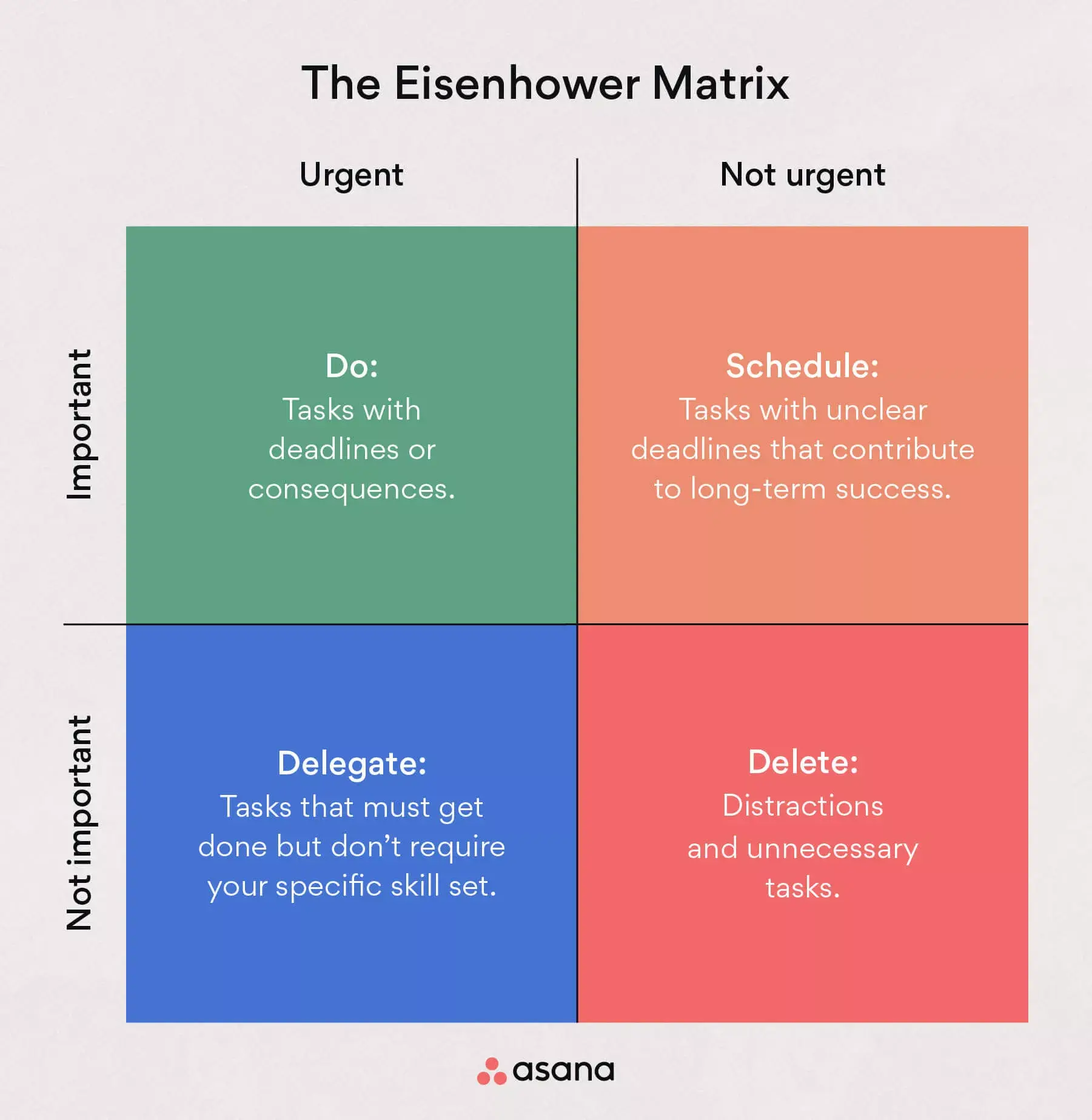
An Eisenhower Matrix is a prioritization tool that helps you organize tasks by urgency and importance into four quadrants: do, delegate, schedule, or delete. Each quadrant maps to a specific action depending on whether a task is urgent, important, both, or neither:
Urgent and important: Do
Urgent but not important: Delegate
Not urgent but important: Schedule
Not urgent and not important: Delete
If your to-do list feels overwhelming, the Eisenhower Matrix helps you see which tasks to do first and how to handle the rest.
What is an Eisenhower Matrix template?
An Eisenhower Matrix template is a reusable guide that lets you quickly create one whenever you need to prioritize your task list. If you want to create a matrix every morning or at the start of each week, no problem! Just copy the template, add your tasks, and start prioritizing.
With a ready-made template, you save time because you don't have to set up your Eisenhower Matrix from scratch each time. Just fill in the details and follow the steps to prioritize your tasks.
Why use an Eisenhower Matrix template
When your task list is long and demanding, it can be tough to decide where to begin. An Eisenhower Matrix template gives you a simple, repeatable way to sort your tasks so you can focus on what matters most. Here are some main benefits:
Clear priorities: Instead of guessing which tasks deserve your attention, the matrix helps you categorize every to-do by urgency and importance. You always know what to tackle first.
Better time management: By assigning each task to a specific quadrant, you spend less time deciding what to do and more time doing it. Delegable or deletable tasks stop eating into your schedule.
Reduced stress: A long to-do list can feel paralyzing. Once you sort tasks into the four quadrants, you'll see that not everything needs your immediate attention, making the workload feel more manageable.
Improved decision-making: The matrix gives you a simple way to evaluate each task before committing to it. Over time, this builds better habits for prioritizing and planning your work.
Benefits of a digital Eisenhower Matrix template
The Eisenhower Matrix is meant to make managing tasks easier, not harder. Using a digital version means you don't need to deal with spreadsheets or copy your task list by hand every time.
You can simply add your tasks to the matrix, choose their urgency and importance, and move them into the right section. If your priorities change, you can quickly update your matrix without starting over.
With a digital Eisenhower Matrix template, you can:
Simplify decision-making with a predefined task-prioritization process.
Quickly add tasks to your Eisenhower Matrix template instead of copying to-dos over again.
See a single source of truth for each task, because the to-dos in your matrix aren't duplicates. They live in your task list and your matrix at the same time.
Add contextual information, documents, images, or videos to each task.
Share your matrix with project stakeholders to illustrate how you're prioritizing work.
Set due dates for tasks you're delegating or scheduling for later.
Drag and drop tasks into different sections of your matrix.
Easily update your matrix if priorities change later on.
How to create a digital Eisenhower Matrix template
At its most basic, your Eisenhower Matrix template should have space to track the following information about each task:
Urgency: Urgent or not urgent
Importance: Important or not important
Recommended action: Do, delegate, schedule, delete
The easiest way is to add two custom fields to your template: one for urgency and one for importance. This lets you quickly choose and see how urgent and important each task is.
Next, make sections in your template for each action: Do, delegate, schedule, or delete. After you pick the urgency and importance for each task, move it into the right section. Use Board view to see each section as its own column, so you can read your matrix at a glance.
Integrated features
Add tasks to multiple projects. The nature of work is cross-functional. Teams need to work effectively across departments. But if each department has its own filing system, work stalls and gets siloed. Asana makes it easy to track and manage tasks across multiple projects. This reduces duplicate work and increases cross-team visibility. It also helps your team see tasks in context, view who's working on what, and keep tasks and team members connected.
Custom fields. Custom fields are the best way to tag, sort, and filter work. Create custom fields for any information you need to track, from priority and status to email addresses and phone numbers. Use custom fields to sort and schedule your to-dos so you know what to work on first. Plus, share custom fields across tasks and projects to ensure consistency across your organization.
List View. List View is a grid-style view that lets you see all your project's information at a glance. Like a to-do list or spreadsheet, List View shows all your tasks at once, including task titles, due dates, and any relevant custom fields, such as Priority, Status, and more. Unlock effortless collaboration by giving your entire team visibility into who's doing what by when.
Start dates. Sometimes, you don't just need to track when a to-do is due; you also need to know when you should start working on it. Start times and dates give your team members a clear sense of how long each task should take. Use start dates to set, track, and manage work, align your team's goals, and keep dependencies from falling through the cracks.
Recommended apps
Gmail. With the Asana for Gmail integration, you can create Asana tasks directly from your Gmail inbox. Any tasks you create from Gmail will automatically include the context from your email, so you never miss a beat. Need to refer to an Asana task while composing an email? Instead of opening Asana, use the Asana for Gmail add-on to simply search for that task directly from your Gmail inbox.
Outlook. As action items come in via email, like reviewing work from your agency or a request for design assets from a partner, you can now create tasks for them in Asana right from Outlook. You can then assign the new task to yourself or a teammate, set a due date, and add it to a project so it's connected to other relevant work.
Google Drive. Attach files directly to tasks in Asana using the Google Workspace file picker, built into the Asana task pane. Attach any My Drive file in just a few clicks.
Slack. Turn ideas, work requests, and action items from Slack into trackable Asana tasks and comments. Go from quick questions and action items to tasks with assignees and due dates. Capture work easily so requests and to-dos don't get lost in Slack.
How to use your Eisenhower Matrix template
Once you create your template, using it is simple. Here's how:
Make a copy of our Eisenhower Matrix template.
Add each task in your to-do list to the template.
Select the urgency and importance of each task. If you're not sure how to distinguish between urgent tasks and important tasks, check out our Eisenhower Matrix article.
Drag and drop each task into its section: Do, Delegate, Schedule, or Delete.
Update the due date and assignee for each task based on the action you've selected.
A few tips to keep your matrix useful:
Expect most tasks to land in Schedule. Planning pays off for important work that isn't urgent yet.
Keep Delete short and act on it. Busywork adds up fast: Asana's State of Work Innovation 2024 report found it takes up 53% of workers'time.
Review your matrix on a set rhythm, daily or weekly, and move tasks as priorities shift.
Share the project with your team so delegated tasks have a clear owner and due date.
Eisenhower Matrix examples for each quadrant
Do (urgent and important): A client deliverable due today, a production issue blocking your team, or a deadline you can't move.
Schedule (not urgent but important): Quarterly planning, skill development, process improvements, and relationship-building with stakeholders.
Delegate (urgent but not important): Routine status reports, scheduling requests, and most incoming requests that someone else on your team can own.
Delete (not urgent and not important): Recurring meetings without a clear purpose, low-value busywork, and tasks you only do to feel busy.
In Asana, each example becomes a task in the matching section, with an assignee and due date that reflect the action.
Get started with your Eisenhower Matrix template
When you know exactly which tasks to do, delegate, schedule, or delete, you spend less time second-guessing and more time making progress. Here's a quick recap of what you've learned:
What it is: A four-quadrant tool that sorts tasks by urgency and importance.
Why it works: It gives you clear priorities, better time management, and less stress.
How to use it: Copy a digital template, add your tasks, tag urgency and importance, then drag each task into the right quadrant.
A digital Eisenhower Matrix template in Asana gives you a reusable, shareable way to prioritize your work and focus on what matters most. Get started and use your first Eisenhower Matrix template today.
Use an Eisenhower Matrix templateFAQs about the Eisenhower Matrix template
The Eisenhower Matrix is named after Dwight D. Eisenhower, the 34th US president. In a 1954 address in Evanston, recorded by The American Presidency Project, he quoted a former college president who said, "I have two kinds of problems, the urgent and the important." Author Stephen Covey later turned that idea into the four-quadrant prioritization tool used today.
If you regularly face a long to-do list and struggle to decide what to tackle first, a template gives you a repeatable process for sorting tasks by urgency and importance. It removes the guesswork so you can start working on the right things right away.
It depends on how quickly new tasks come in. If your workload changes daily, create a new matrix each morning; if it's more stable, once a week is usually enough.
Share the template with your direct reports or project teammates so everyone uses the same criteria to prioritize work. When your team agrees on what needs attention now and what can wait, it’s easier to avoid taking on too much at once.
Yes, you can set up a basic four-quadrant grid in Excel or Google Sheets. For easier drag-and-drop sorting, real-time updates, and team collaboration, a digital tool like Asana is a more flexible option.
Not at all. You simply sort each task into one of four quadrants based on urgency and importance, so you don't need special training.
Your Do quadrant should hold tasks with near deadlines and real consequences if they're delayed. Examples include a client deliverable due today or an issue blocking your team. Try to keep this quadrant small. If Do gets crowded, that's a signal that important work in Schedule is being put off.
Ideally, most of your tasks belong in Schedule, the quadrant for work that's important but not urgent. Planning that work early keeps it from becoming urgent later. If your Do quadrant is always the largest, it's a good moment to review your planning rhythm and how often you sort new tasks.
Ask two questions about each task: does it support one of your goals, and does someone depend on it? If the answer to both is no, the task belongs in Delete. Tasks that feel urgent but don't need your skills belong in Delegate, where someone else can own them.
Related templates




















Create templates with Asana
Learn how to create a customizable template in Asana. Get started today.