


Kanban card template
Learn what each Kanban card should include, how to choose the right template, and how to build a repeatable workflow that helps work move from request to completion.
Sign up to create your own template.
Kanban card template
Learn what each Kanban card should include, how to choose the right template, and how to build a repeatable workflow that helps work move from request to completion.
Create your templateSign up to create your own template.
INTEGRATED FEATURES
Recommended apps




Summary
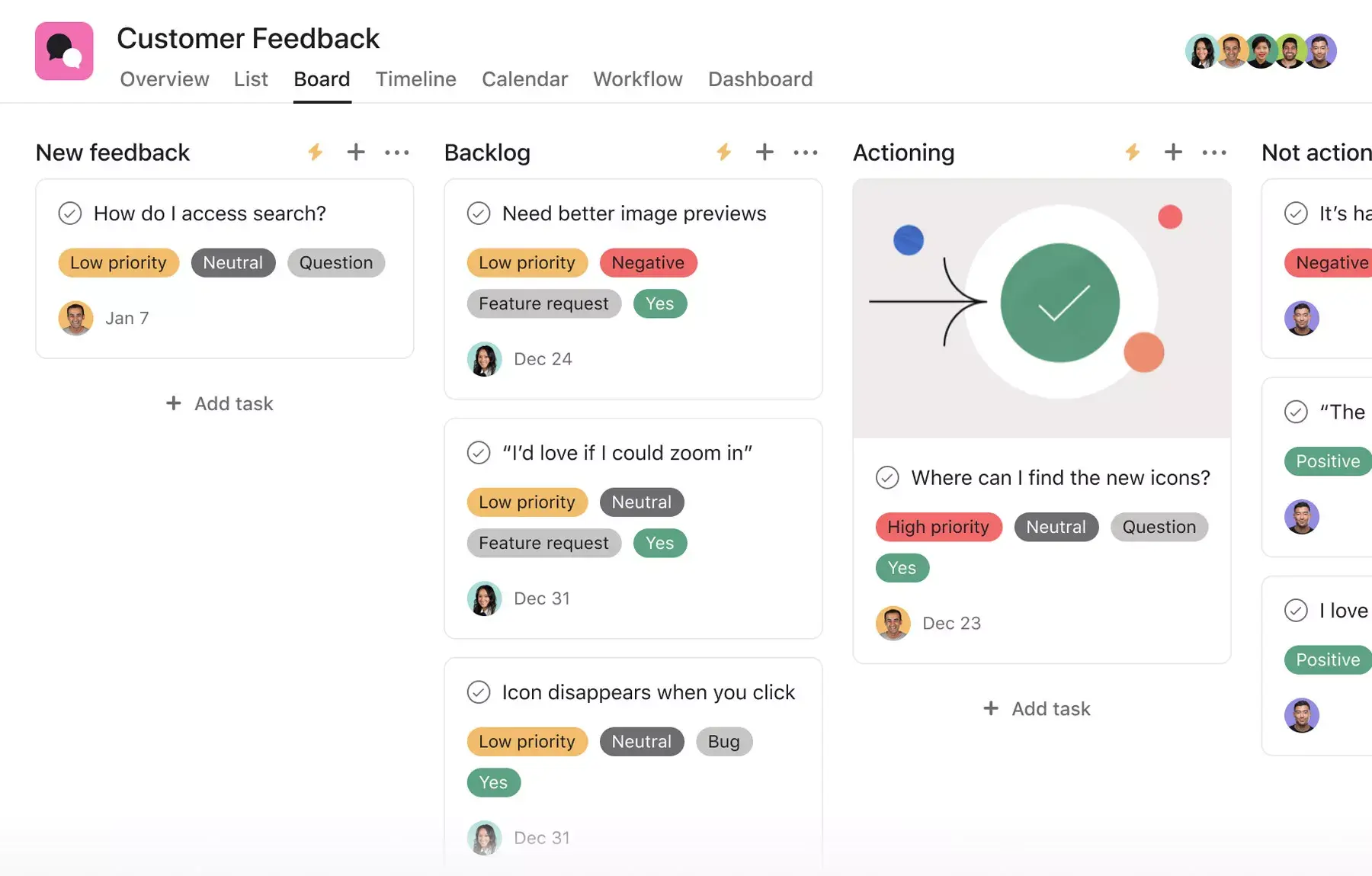
Kanban is a common project management methodology that helps teams balance the work they need to complete with each team member's availability. The idea is that team members "pull" tasks out of a backlog and move them through designated workflow stages. Typically, teams implement the Kanban method via Kanban boards.
If the Kanban board is a skeleton, Kanban cards are the muscle. Kanban cards contain all the information team members need to complete a task. If your team is looking to create a more consistent Kanban process, creating a Kanban card template can help speed up your workflows.
In this article, you'll learn what a Kanban card template is, the different types of templates you can use, how to create and use one, and best practices for effective card design.
What is a Kanban card template?
A Kanban card template is a repeatable format you can copy to easily create new, standardized tasks on a Kanban board. Each card contains relevant information for a task, including an overview, key dates, key stakeholders, and the task status. Instead of building every card from scratch, a template gives your team a consistent starting point.
Create your Kanban card templateTemplates do more than keep things consistent. They give your team the information they need to start working right away. Here's why that matters:
Less time chasing details: When all the necessary information is in one place, team members can focus on completing the task instead of tracking down missing context.
Standardized task requests: Consistent formatting ensures every incoming task has the same information organized in the same way.
Faster onboarding: New team members can quickly understand your workflow by looking at the card structure.
![[Product ui] Kanban card task in an Asana project, Kanban board style view (Boards)](https://assets.asana.biz/transform/303c582f-9b37-4ec3-b74a-396c12175a18/TG23-web-hero-029-discount-code-static-2x?io=transform:fill,width:2560&format=webp)
Types of Kanban card templates
Not every team uses Kanban cards in the same way. The template you choose should reflect the type of work your team does and the information they need to stay on track.
Basic Kanban card template: This is the simplest version, ideal for teams just getting started with Kanban. It includes a task name, assignee, due date, and status column. Use this when your workflow has straightforward stages like "To do," "In progress," and "Done."
Software development Kanban card template: Built for engineering and development teams, this template adds fields for story points, acceptance criteria, and sprint or iteration tracking. It helps developers understand both the scope and the technical requirements of each task.
Marketing Kanban card template: Marketing teams often manage multi-step campaigns with several approvers. This template includes fields for campaign name, content type, review stage, and approval status, so creative work moves through the pipeline without bottlenecks.
Operations Kanban card template: For teams managing repeatable processes such as onboarding, procurement, or IT requests, this template defines task categories, priority levels, and completion checklists to keep recurring workflows running.
The right template depends on your team's workflow. Start with the type that's closest to how you work today, then customize it as your process evolves.
How to create a Kanban card template
When you're creating your Kanban card template, work with your Scrum team or Agile team members to brainstorm all of the information they may need to accurately complete a task in a Kanban board. This can help prevent bottlenecks or delays in production time by minimizing the need to chase down information.
It's important that your Kanban card template includes the right information. Here are a few things commonly found on a Kanban card.
An actionable task name: Starting task names with a verb clarifies what needs to be done. For example, "Add functionality to web app" makes it clear what work needs to be done for this task at a high level.
Key dates: Depending on your team's workflow, certain dates are important to both project managers and developers. For example, a project manager may need to know the start date of a task, whereas a developer may need to know when it needs to be completed.
Task owner: The individual responsible for completing the task. If anyone has questions about this specific task, they can contact this person for clarification.
Task status: In the Kanban system, this is often represented by the card's position on the board. Every team has a unique workflow for tracking work in progress, so it's important that everyone knows the stages on your team's Kanban board.
Some information on a Kanban card is also important for project managers to know. Here's some optional information that can provide important context for project managers:
Task priority: This is how important an individual task is in comparison to the other tasks around it. Prioritizing tasks can help optimize lead time for the tasks that need it. This can help your development team decide what tasks to complete first.
Story points: Story points are a way to measure tasks by the time or effort required to complete them. This information is important for task management, as a project manager can prevent their team from becoming overloaded with too much work.
Overarching project or initiative: Some teams have tasks from multiple projects on a single Kanban board. Labeling which initiative a card belongs to provides context for the developer and keeps information organized for other stakeholders.
Subtasks: Some tasks may require enough work that they can be split into smaller subtasks. Attaching these tasks to a parent task helps keep work organized.
Time tracking: If you work for an agency, it's important for client billing and pricing.
What to include on a Kanban card
A well-designed Kanban card provides information at two levels: a quick surface view and a detailed deep dive. Think of it as the front and back of a physical card.
Surface view
Task title
Assignee
Due date
Priority indicator
Detailed view
Full description
Acceptance criteria
Attachments and links
Comments and activity
Include enough detail that any team member can pick up the card and know what to do next, but avoid clutter that makes the board harder to scan.
How to use a Kanban card template
Once your team agrees on the information each card needs, you can build your template in a digital project management tool. Here's how to put it into action:
Create a template card: Set up a single card with all the fields, labels, and structure your team agreed on.
Duplicate for each new task: Copy the template whenever new work comes in, then fill in the task-specific details.
Update in real time: Because the card lives in a digital tool, everyone on your team sees changes the moment they happen.
Integrated features
Forms. When someone fills out a Form, it appears as a new task in an Asana project. By taking in information via a Form, you can standardize how work gets kicked off, gather the information you need, and ensure no work falls through the cracks. Instead of treating each request as an ad hoc process, create a standardized system and a set of questions that everyone must answer. Or, use branching logic to tailor questions based on a user's previous answer. Ultimately, Forms help you reduce the time and effort required to manage incoming requests, so your team can spend more time on the work that matters.
Automation. Automate manual work so your team spends less time on the busywork and more time on the tasks you hired them for. Rules in Asana operate on a trigger-and-action model: "when X happens, do Y." Use Rules to automatically assign work, adjust due dates, set custom fields, notify stakeholders, and more. From ad hoc automations to entire workflows, Rules gives your team time back to focus on strategic work.
Custom fields. Custom fields are the best way to tag, sort, and filter work. Create unique custom fields for any information you need to track, from priority and status to email or phone number. Use custom fields to sort and schedule your to-dos so you know what to work on first. Plus, share custom fields across tasks and projects to ensure consistency across your organization.
Subtasks. Sometimes a to-do is too big to fit into a single task. If a task has more than one contributor, a broad due date, or stakeholders who need to review and approve before it can go live, subtasks can help. Subtasks are a powerful way to distribute work and split tasks into individual components, while keeping the small to-dos connected to the overarching context of the parent task. Break tasks into smaller components or capture the individual components of a multi-step process with subtasks.
Recommended apps
Slack. Turn ideas, work requests, and action items from Slack into trackable tasks and comments in Asana. Go from quick questions and action items to tasks with assignees and due dates. Easily capture work so requests and to-dos don't get lost in Slack.
Google Workplace. Attach files directly to tasks in Asana using the Google Workplace file chooser built into the Asana task pane. Easily attach any My Drive file with just a few clicks.
GitHub. Automatically sync GitHub pull request status updates to Asana tasks. Track pull request progress and improve cross-functional collaboration between technical and non-technical teams, all within Asana.
Jira. Create interactive, connected workflows between technical and business teams to increase real-time visibility into the product development process, all without leaving Asana. Streamline project collaboration and handoffs. Quickly create Jira issues in Asana, so work flows seamlessly between business and technical teams at the right time.
Best practices for Kanban card design
A well-designed Kanban card makes work easier to understand, track, and complete. Here are a few best practices to keep in mind as your team builds and refines your cards.
Keep cards current: Update your cards as work progresses. Cards should reflect real-time status so your team can trust the board as a single source of truth, especially during daily stand-ups or weekly syncs.
Use labels and color coding wisely: Colors and labels help differentiate card types, priorities, or teams at a glance. But don't overdo it. Too many visual indicators can create clutter instead of clarity.
Establish column policies: Define what it means for a card to move from one column to the next. For example, a card shouldn't move to "In review" until all subtasks are complete. Policies keep work flowing smoothly.
Limit work in progress: One of the core principles of Kanban is to limit how many cards can be in any given column at once. This helps prevent bottlenecks and keeps your team focused on finishing work before starting new tasks.
Review and refine regularly: Your Kanban card template should evolve with your team's workflow. Revisit your template periodically to make sure it still captures the information your team needs to do their best work.
Manage your workflow with Asana
A Kanban card template gives your team a consistent way to capture task information, stay aligned, and move work forward. With Asana, you can create Kanban card templates, automate repetitive workflows, and give your whole team real-time visibility into project progress. Get started with a free Kanban board in Asana and see how easy it is to keep your team's work on track.
Create your Kanban card templateFAQs about Kanban card templates
Start by discussing with your team the information they need to complete a task, then input those fields into a digital project management tool that supports templates. This ensures every new card is consistent and ready to use from the start.
Typically, your Kanban card template should include an actionable task name, key dates, task owner, and the task status (which is commonly represented by the column the card is in). Some other information you can add to your Kanban card template includes task priority, story points, overarching project title, subtasks, and time tracking.
A Kanban card system, also known as a Kanban board, is a project management methodology designed for a process of continuous improvement where tasks are "pulled" from a backlog and into a standard workflow. Each of these tasks are represented by a card, and columns designate what stage in the workflow a task is in.
In most cases, no. Digital Kanban card templates let your team update cards in real time, so everyone always has the latest information and nobody works from outdated details.
The four core principles of Kanban are: visualize your work, limit work in progress, focus on flow, and pursue continuous improvement. Together, these principles help teams increase transparency, reduce bottlenecks, and deliver work more efficiently.
Related templates
![[Templates] Sprint Retro (Card image)](https://assets.asana.biz/transform/889d64ca-6f95-485f-888a-b015a0932852/TG23-web-hero-049-launch-post-mortem-thumbnail-2x?io=transform:fill,width:2560&format=webp)
![[Templates] Web Design Process (Card image)](https://assets.asana.biz/transform/91cfb3ee-da0a-44d4-82a4-3cc08d1d6451/TG23-web-thumbnail-035-changelog-static-2x?io=transform:fill,width:2560&format=webp)
![[Agile Daily Standup] template Card Image](https://assets.asana.biz/transform/0df37b8d-d69a-42af-b4ac-c0fc41658276/TG23-web-thumbnail-019-weeklytodo1-static-2x?io=transform:fill,width:2560&format=webp)

![[Templates] Software and System Deployment (Card image)](https://assets.asana.biz/transform/8b9bb024-d81b-48ec-8cd8-148453823fbe/software-and-system-deployment?io=transform:fill,width:2560&format=webp)

Create templates with Asana
Learn how to create a customizable template in Asana. Get started today.