


AI resource management: see and rebalance capacity
Why resource planning breaks down before anyone notices

Capacity is a guess, not a number
You usually build a staffing plan once from a spreadsheet of names and percentages. Work changes daily, but you update allocation monthly, which means it goes stale the moment your team’s schedule shifts. A resource manager approving a project based (unknowingly) on an outdated allocation plan from three weeks ago won’t find out until the first milestone review slips through the cracks.

Overload shows up as a missed deadline, not a warning
Your team tracks effort task by task, but rarely sums it up per person across everything they're on. A senior designer can be assigned to four projects, sitting overcapacity for weeks before anything flags it. And the person blamed is the one who was carrying too much.

Rebalancing takes longer than the problem takes to get worse
Once overload is visible, fixing allocation requires your operations lead to spend a half-day (or more) cross-referencing who has the right skills and room to step in. With multiple tabs and a data-heavy spreadsheet in front of you, the main concern is how moving the work affects other timelines. By the time the reassignment lands, the schedule has already moved again.
How AI resource management works in Asana
Asana is the AI resource management software where your team’s capacity and planning connect. Update your work and watch as your availability changes with it.
Turn capacity into a live number instead of a monthly guess
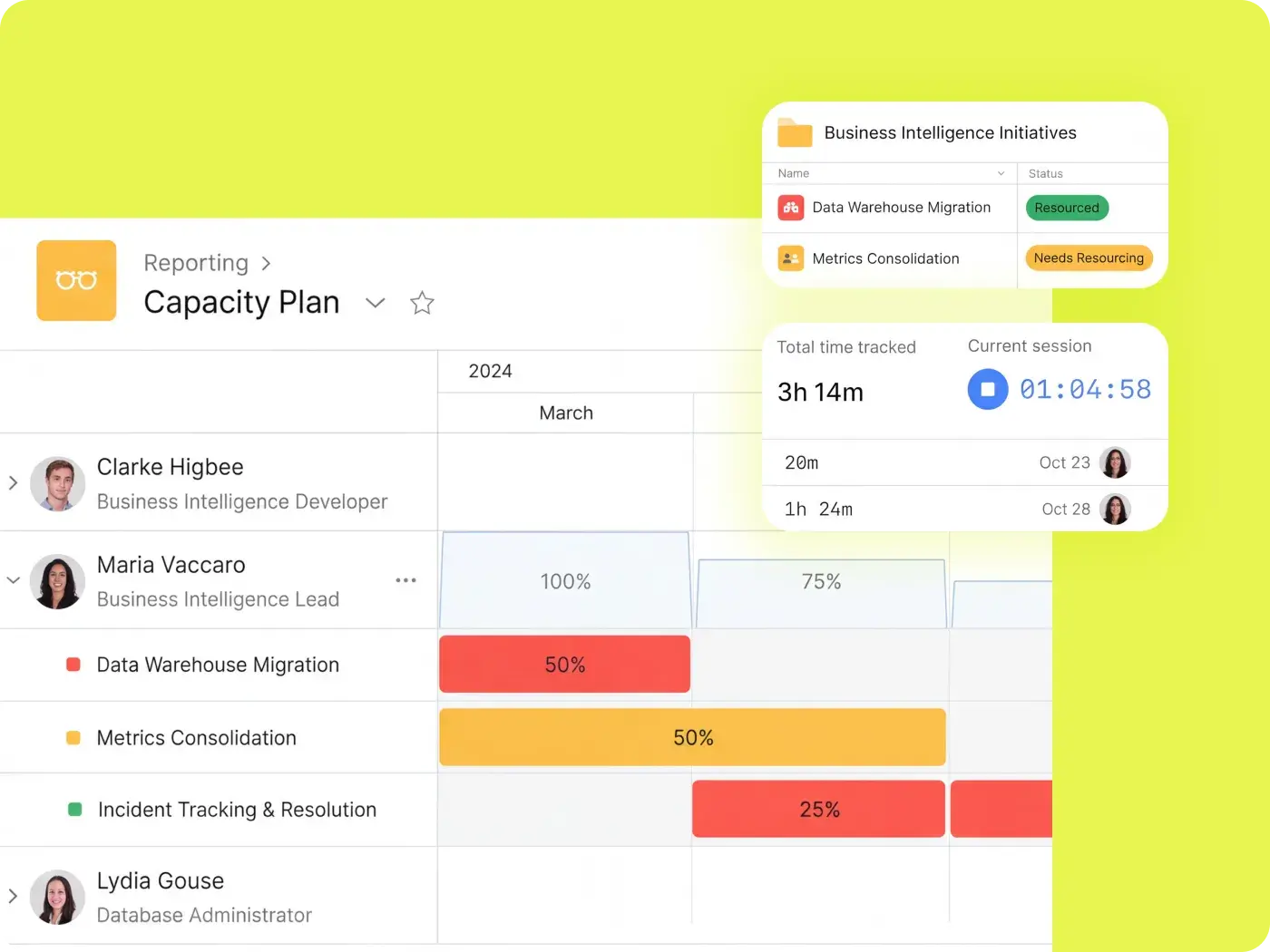
Workload reflects the work already in your system, building a picture of your team's capacity that's viewable by day, week, month, or quarter. Using AI resource planning, you set the effort per task (hours or points) and the maximum capacity per person, and the view updates as assignments change.

Get flagged before someone is underwater
On the Enterprise plan, capacity planning is in one place, so anyone past their limit is visible the moment you open the view. You can see capacity across every project a person is assigned, and you can ask AI to determine which workstreams are off track and need more support. You can also configure AI Studio to flag risks and blockers, then generate an executive summary on its own schedule.

Rebalance in minutes, with the downstream effects visible
Reassign tasks where your team’s capacity and schedule already exist. Drag a task to a new owner or date, and the effects show on every project timeline. Say a developer is booked at 150% across two sprints the week before a client launch. You drag two of their tasks to a teammate with open capacity, and all due dates tied to that work follow, showing how the whole plan holds up before you commit to the change.

Connect resourcing to what the work actually costs
Capacity tells you someone is busy. Time tracking tells you whether the time matches the work's value by comparing logged hours to the original estimate. Roll that up with Portfolios across every project a team runs, and a resource manager can show leadership where the real constraint is and which project is consuming all the hours.

Purpose-built for the teams that own capacity
Control capacity and time worked for all your team members, everywhere. Here’s how different teams use Asana for AI resource allocation.

![[チーム - OS] PMO の受け付け (画像)](https://assets.asana.biz/transform/52e2b46b-6cdf-41f7-bb18-e20cd55b27fb/ops-pmo-intake-mid-fi?io=transform:fill,width:2560&format=webp)



![[チーム - エージェンシー] ヒーロー画像](https://assets.asana.biz/transform/bd8fb516-1527-40d9-a49d-1978e69c189e/-16_9-Hero-Agency-Lo-Fi?io=transform:fill,width:2560&format=webp)
Work from live data
You own allocation across a whole portfolio, but the data you receive is outdated and assembled by hand from multiple project leads. With Asana, you get a single live capacity picture across every portfolio you're responsible for, so over-allocation is visible — and you know what to do about it — before it becomes a delivery risk.
Asurion improved capacity planning with 89% team utilization
Asurion is a global technology care company serving more than 300 million customers. With custom rules, time tracking, and portfolios in Asana, Asurion implemented a tightly integrated system that automates intake and task creation while aligning work across teams.


Asana has completely changed the way our design team works. We now have full visibility into priorities, timelines, and workloads, which has helped us deliver higher-quality work faster—and with less burnout.Mike Evans
Sr. Manager Multimedia, Asurion
See your team's real capacity this week
Stop planning your team’s capacity from memory. Open Workload to see who has room, and promise the work to someone with the space to see the project through.
AI resource management FAQs
AI resource management uses artificial intelligence to forecast capacity, match people to work, and automatically surface over-allocation across projects. Unlike manual resource planning, which relies on someone rebuilding the picture from memory and separate trackers, AI resource management reads the work directly and keeps your team’s capacity picture current as assignments change.
AI replaces three manual resource-allocation steps with a single current view: It reads committed work against real capacity, shows the downstream effect of a reassignment before you commit, and flags over-allocation before it becomes a missed date. In Asana, all three steps use the same data within the same system.
Look for whether the capacity data is live, whether the tool surfaces problems on its own, and whether allocation connects to tracked time, so utilization is provable. For more in-depth considerations, you can find a full buyer’s resource and feature checklist in our resource management software roundup.
No. While AI removes the reconstruction work, it doesn’t eliminate the judgment about who should do which work and why. AI resource management changes how a manager spends their time, emphasizing strategic decision-making over simple scheduling.
Asana is enough for resource management for most 200–5,000-person organizations, since you build the capacity picture from live project data rather than from a separate system you keep in sync by hand. But if you need deep financial forecasting, multi-entity billing rates, or formal skills inventory management, you may want to consider pairing Asana with a dedicated project portfolio management (PPM) system or a professional-services automation platform.
Asana AI, including AI Teammates, Asana Dash, and AI Studio, is included on Starter, Advanced, and Enterprise plans. Unlimited portfolios and resource management features are available for Advanced plans and above. Universal resource management and capacity planning are included with Enterprise plans. Compare Asana pricing and feature availability before committing to a plan to make sure the AI resource management features your team needs are available.
Yes, Asana integrates with more than 200 apps and solutions, including time-tracking tools such as Harvest and Toggl Track and reporting tools like Tableau and Power BI.
Your capacity picture in Asana will only populate once you assign tasks and set effort. The best bet for getting this view up and running quickly is to prioritize creating projects and tasks. Once you assign these factors, the Workload view populates immediately.