


Powered by AI
IT ticketing template
Bugs, tickets, and requests are a lot to manage, and it's easy to get disorganized. Instead, track everything with our IT request template.

![[Templates] IT Ticketing - hero](https://assets.asana.biz/transform/b62acdca-df80-4f15-af0f-5a85cd769ef1/Ticketing-IT-Ticketing-Workflow-Package?io=transform:fill,width:2560&format=webp)
Powered by AI
IT ticketing template
Bugs, tickets, and requests are a lot to manage, and it's easy to get disorganized. Instead, track everything with our IT request template.




Organize tickets to resolve them on time, every time
An IT ticketing system template is a ready-made workflow that helps your team capture, organize, and track technical requests as they come in. Templates standardize how help desks route service requests and support tickets from intake to resolution, so nothing falls through the cracks and everyone knows who is responsible for what. With built-in categories, SLAs, automation capabilities, and AI-powered actions, Asana’s ticketing system helps team members respond faster, prioritize what matters, and resolve issues with fewer complications.
Collect each ticket with a reliable tracking workflow.
A built-in ticket form standardizes submissions, while ticket IDs, email follow-ups, and team-only comments give teams one place to collect information and coordinate next steps.
Review and respond to tickets faster without adding extra work.
AI auto-names each ticket, asks for missing information, and drafts responses so teams move through intake quickly instead of spending time on repetitive follow-up.
Organize every ticket with a status system your team understands.
Custom status types give teams a simple way to label tickets, follow progress, and troubleshoot tasks that need attention.
Monitor response and closure with accurate timing.
Response and closure SLA timers record how long tickets remain open, and team work schedules reveal coverage issues and adjust resources when needed.
Track progress and workload in one place.
A performance dashboard displays ticket volume, timing, and completion trends so teams can better understand how tickets move through their workflow and make adjustments.
Why use an IT ticketing template?
IT problems can be complex, but teams still need a simple way to report issues. All too often, these requests come in from various channels, missing details, and with arbitrary priority levels. That means IT teams lose track of tickets and get pulled in too many directions. By standardizing how you track and prioritize each request with our IT ticketing template, you can get all the information you need without slowing down your teammates. IT requests are resolved on time. Our tips below help you make Asana’s IT service management (ITSM)template your own.
See all requests in one place. Have a clear picture of all the requests your team is working on to manage bandwidth and make sure nothing slips through the cracks.
Streamline priorities. Proactive prioritization ensures your team is working on the most relevant work at the right time, without getting overwhelmed.
Uncover common requests. With project sorting, you can quickly identify common issues, helping you improve your ticket management processes and overall service delivery.
Our IT requests template makes it easy to set priorities and due dates so everyone knows when to expect a solution. With the tips above and the right IT project management tools, your team can work more efficiently and proactively, rather than constantly putting out fires.
How to use an IT ticketing workflow template
Asana’s IT ticketing template provides your team with a single project to gather, review, and resolve support requests. It functions like a teammate who organizes incoming tickets, prompts the following action, and keeps work moving forward. This template consolidates requests, guides triage, and tracks each step from ticket creation to ticket resolution.
Collect tickets with a form
Use the ticket form to collect contact details, summaries, and necessary technical information. Each ticket gets a unique ID, allowing your team to follow up via email or add team-only comments for private collaboration. If an employee completes onboarding and reports a broken monitor, the form records equipment details so IT knows exactly which asset to check.

Review tickets with AI
AI names each incoming ticket, identifies missing information, and drafts responses. AI assistance reduces manual review and helps your support teams process high-volume queues with less repetitive work. If a user submits a VPN issue without listing their device type, AI can send notifications to gather missing information before the team begins work.

Organize tickets by status
Customize your status types to sort tickets into stages such as new, in progress, pending, or complete. Custom statuses show the entire team what requires attention and what has moved forward. If a software installation waits on manager approval, the pending status helps IT professionals understand where to route tickets next.

Monitor ticket response and closure
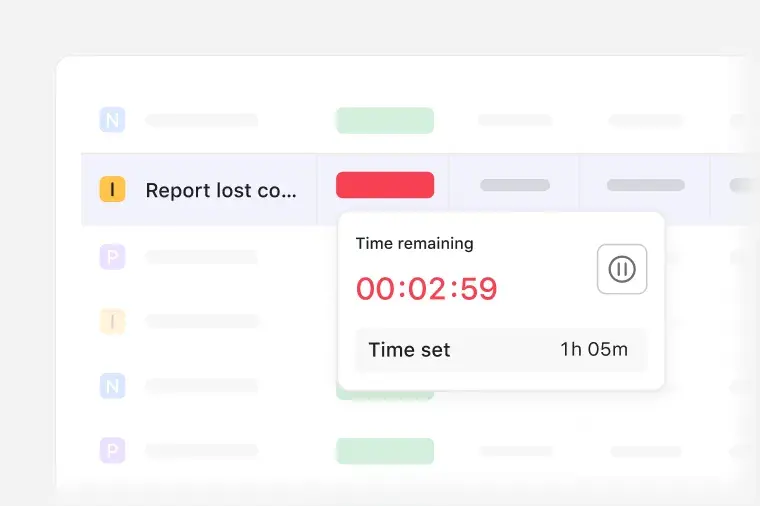
Use SLA timers to track response and resolution times. If a password reset request approaches its limit, the timer alerts the team to address it right away.
Track progress with dashboards
Dashboards display ticket volume, response times, completion rates, and other real-time metrics. Charts and timelines reveal bottlenecks and help teams optimize their ticketing workflow. If a dashboard shows a spike in help desk ticketing, your IT operations team can investigate the cause and plan next steps.

Asana’s IT ticketing workflow template is like an extra teammate who organizes ticket intake, guides triage, and supports faster resolution. AI reduces manual effort, rules automate routine tasks, and dashboards show how support queues behave over time. Your team will enjoy a repeatable process that helps route tickets, manage deadlines, and improve outcomes across the entire support system.
This IT ticketing template uses Asana AI to minimize manual effort, accelerate request processing, and improve information accuracy in your workspace. Instead of requesting more details, identifying issues yourself, or drafting repetitive responses, you can delegate these tasks to automated intelligence that supports your team from the moment a request enters your ticketing system.
Review tickets with AI. Scan the details of each request and identify what needs action before someone reads the full entry.
AI auto-names each ticket. Generate a concise, descriptive title for each ticket to keep requests organized and searchable.
AI follows up for missing information. Detect gaps in submitted requests and prompt end users to provide details without involving a teammate.
AI drafts responses. Produce a starting reply for everyday issues to save your team time and give them a response they can refine and send.
For example, imagine a user submits a vague ticket like “My printer isn’t working.” AI automatically renames the ticket to “Printer offline in Finance,” identifies missing details, such as the model number or error messages, and sends a follow-up prompt to request that information. By the time your help desk reviews the request, the ticket already includes specifics and a suggested reply.
Customers that use Asana templates to work



![[Logo] Affirm](https://assets.asana.biz/transform/5c33f186-151e-4999-b0b5-4081f236b3cd/Affirm_logo-svg?io=transform:fill,width:2560&format=webp)





Related templates
![[Work Requests] Template Card Image](https://assets.asana.biz/transform/c019b1e0-670b-4821-849c-d23664b570b8/Template_WorkIntake_Thumb?io=transform:fill,width:2560&format=webp)
![[Templates] Bug Tracking (Card image)](https://assets.asana.biz/transform/49cc8463-4baa-4031-ae46-5ed41fdbe2b8/TG23-web-thumbnail-013-issue-log-2x?io=transform:fill,width:2560&format=webp)
Frequently asked questions
An IT ticketing system template provides your team with a ready-made workflow for collecting, tracking, and resolving technical requests. IT ticketing templates standardize the process of moving issues from intake to resolution, so everyone knows what to do and the status of each request.
Asana’s ticket system template gives you one workspace to manage tasks that often require separate help desk software or a CRM. With Asana, instead of switching between project management platforms, you can track requests, automate steps, and customize workflows directly alongside the work itself. Our IT support ticket template is also scalable. As your organization grows, your request process stays consistent without adding new ticketing software.
Yes, you can assign tickets to external service providers, include them in relevant tasks, and give them access to the information they need. With an IT support template, you centralize communication channels and prevent details from getting lost in email threads or Slack messages.
Yes, you can gather requests from different channels and direct them into the same workspace. Whether you’re part of an enterprise team or a small business, Asana’s service ticket template manages your entire intake process and avoids the need for your team to chase down information across multiple tools or communication platforms.
Yes, you can connect forms that act as a self-service portal, allowing people to submit requests without waiting for a service desk to collect details. This speeds up intake and helps your team start work with the information they need.