How to create a project roadmap around key milestones


85% of Fortune 100 companies choose Asana1






A roadmap helps your team agree on what your project will achieve, the major commitments along the way, and where one person’s work depends on another’s. Project roadmaps give stakeholders a useful overview before they review the detailed plan.
You might start with a project charter or business case. Then use the roadmap to outline milestones and discuss delivery dates with the team members doing the work. In this guide, you’ll learn how teams use project roadmaps, build one in Asana in five steps, and update it as plans change.
What is a project roadmap?
A project roadmap provides a high-level overview of deliverables, key milestones, and overall goals. It also outlines when major phases occur and how they are connected.
Use the roadmap to discuss project scope, resources, and timelines with stakeholders. Your project plan then details individual tasks, responsibilities, budget, and success metrics.
How teams use project roadmaps
A roadmap helps teams prioritize, coordinate handoffs, and provide stakeholders with visibility into upcoming work. These connections are essential when multiple teams contribute to the same outcome.
In The State of Work Innovation 2024, Asana found that 41% of collaboration time on its platform was cross-functional, based on usage analysis of 100,000 paid US users. Showing the work between teams helps people see whose input they need and when.
The following examples illustrate how teams manage these decisions in Asana, from individual projects to broader organizational roadmaps.
Coupa: Prioritize work that supports business goals
Before committing to work, agree on the business goal it supports. Coupa’s Value Services project management office asks teams to map each proposed initiative to at least one of three organizational goals. Its Asana intake form also collects the business use case, teams involved, timing, and executive sponsor.
“Asana gives executive leadership visibility into our organization’s roadmap and performance in one place,” said Saverio Ferme, Coupa’s Senior Vice President, Global Service Operations.
The team uses these responses to prioritize requests and determine which initiatives to include on the organizational roadmap. Apply the same principle to your project by explaining how each major deliverable supports the objective before scheduling it.
Spotify: Coordinate workflows across teams
A roadmap should indicate where your team requires input from others. Spotify’s Network Infrastructure & Operations team developed an Asana template for technology implementations in new offices. It captures internal, network, and external requirements at each project stage, and the team assigns tasks directly to external contractors.
“Asana has enabled us to scale advertising campaign production for Spotify and report on the impact of our team in a quantitative way,” said Blair Wilson, Spotify’s Senior Manager, Project Management.
Including these contributors in the plan allows the team to see who owns each step of the workflow. When building your roadmap, include external approvals or vendor commitments that could impact your milestones.
New Relic: Give stakeholders the right view of upcoming work
Stakeholders need an overview without reviewing every delivery task. New Relic’s Total Rewards & Operations team consolidates all fiscal year activities into one Asana project, then adds the same tasks to separate roadmaps for each function. This allows leaders to see the annual overview while functional leaders focus on their teams’ work.
“Asana has helped us showcase where projects are at, and what will happen if milestones are late,” said Dustin Finkle, Marketing Program Senior Director at New Relic.
For each project, determine what information each audience needs to review. Display major milestones and handoffs in the roadmap, and keep detailed tasks accessible to those responsible for delivery.
How to create a project roadmap in 5 steps
To build an effective project roadmap, visualize your project timeline, deliverables, and schedule. Begin with major commitments, then link to the supporting detailed work behind them.
In this marketing project roadmap example, a US team plans a customer webinar for November 20, 2026, to teach customers how to build a reporting dashboard. Maya leads the project and promotion, Leo builds the registration page, and Priya approves messaging and leads the speaker rehearsal. The five steps demonstrate how they build the roadmap and respond to a delayed approval.
Map project timelines with AsanaStep 1: Outline the project schedule
Start by defining what the project should achieve. Asana’s 2024 survey of 13,066 knowledge workers across six countries found that only 42% of individual contributors understood how their work aligned with organizational objectives. Before adding dates, explain how the main deliverables support the desired outcome.

Then establish the start and end dates and map the major phases. In the webinar example, Maya works back from November 20 to leave time for messaging approval, registration, promotion, and rehearsal. The team’s initial schedule looks like this:
Phase or checkpoint | Owner | Initial timing |
Messaging | Maya | Nov 2–5, 2026 |
Messaging approved | Priya | Nov 5, 2026 |
Registration page | Leo | Nov 6–10, 2026 |
Promotion | Maya | Nov 11–19, 2026 |
Speaker rehearsal | Priya | Nov 18, 2026 |
Webinar live | Maya | Nov 20, 2026 |
Plot these phases in Asana’s Timeline view so the team can review timing together. Timeline is available on Asana Starter and higher tiers.
Read: 7 common causes of scope creep, and how to avoid themStep 2: Define deliverables and milestones
Deliverables are the outputs the project will produce, while milestones are significant checkpoints or events in the project’s lifecycle. List major deliverables, identify milestones, and assign each an owner and date.

For the webinar, the registration page is a deliverable. “Messaging approved” is a milestone, as Priya must confirm the message before Leo builds the page. “Webinar live” is another milestone, while the November 18 speaker rehearsal is a task. Define each checkpoint clearly so stakeholders understand what they are approving.
Keep detailed production tasks in the project plan. The roadmap should include enough detail for people to understand commitments and handoffs.
Step 3: Link task dependencies
Task dependencies indicate how one task relies on another. Identify work that must be completed before the next phase begins, and connect those tasks so the team can see the sequence.

In the webinar roadmap, “Messaging approved” blocks “Registration page,” and registration blocks promotion. In Asana, open the registration task and add “Messaging approved” as a Blocked by dependency. Connect promotion to registration similarly. The registration task will then display both its blockers and what it blocks.
Read: Top 20 project management charts to visualize project progressReview these relationships when a date changes. Timeline can help you manage dependent dates, but automatic shifting depends on your settings and the tasks involved. Confirm the revised dates with the people doing the work.
Step 4: Identify risks and plan a response
Identify risks and blockers that could change the roadmap’s dates or scope. For each risk, name an owner, describe the potential impact, and agree on a response and review date.

On November 6, the webinar team learns that messaging approval is now expected on November 9 instead of November 5. Priya owns this risk. Before confirming the November 20 event date, the team proposes these changes:
Priya confirms messaging approval by November 9.
Leo replans registration for November 10–12.
Maya replans promotion for November 13–19.
Record the risk and proposed response in Asana, and use a custom field to flag it for review. Priya and Leo then check whether the proposed dates are achievable.
Read: What is project risk management? 6 steps to boost success
Step 5: Share the roadmap and agree on next steps
Share the roadmap with those responsible for delivery and stakeholders who must approve it. Review the schedule, deliverables, milestones, dependencies, and risks. Ask owners to confirm their commitments and explain any changes before finalizing the dates.

Maya’s November 6 status update makes the webinar decision explicit:
What changed: Messaging approval is expected November 9. Registration moves to November 10–12 and promotion to November 13–19.
Decision needed: Priya, confirm messaging approval by November 9. Leo, confirm registration can be ready by November 12. Keep the webinar on November 20 only if both dates are confirmed.
Next review: November 9.
With Asana, stakeholders can review the roadmap and open the linked tasks for more detail. Keep the status update alongside this work so everyone can see proposed dates, required decisions, and responsible parties.
Read: Project accounting: How to weigh project cost-benefitsProject roadmap examples
There is no single way to create a project roadmap; structure yours to best visualize your work. Here are two examples to help you get started.
Project roadmap example for a virtual event
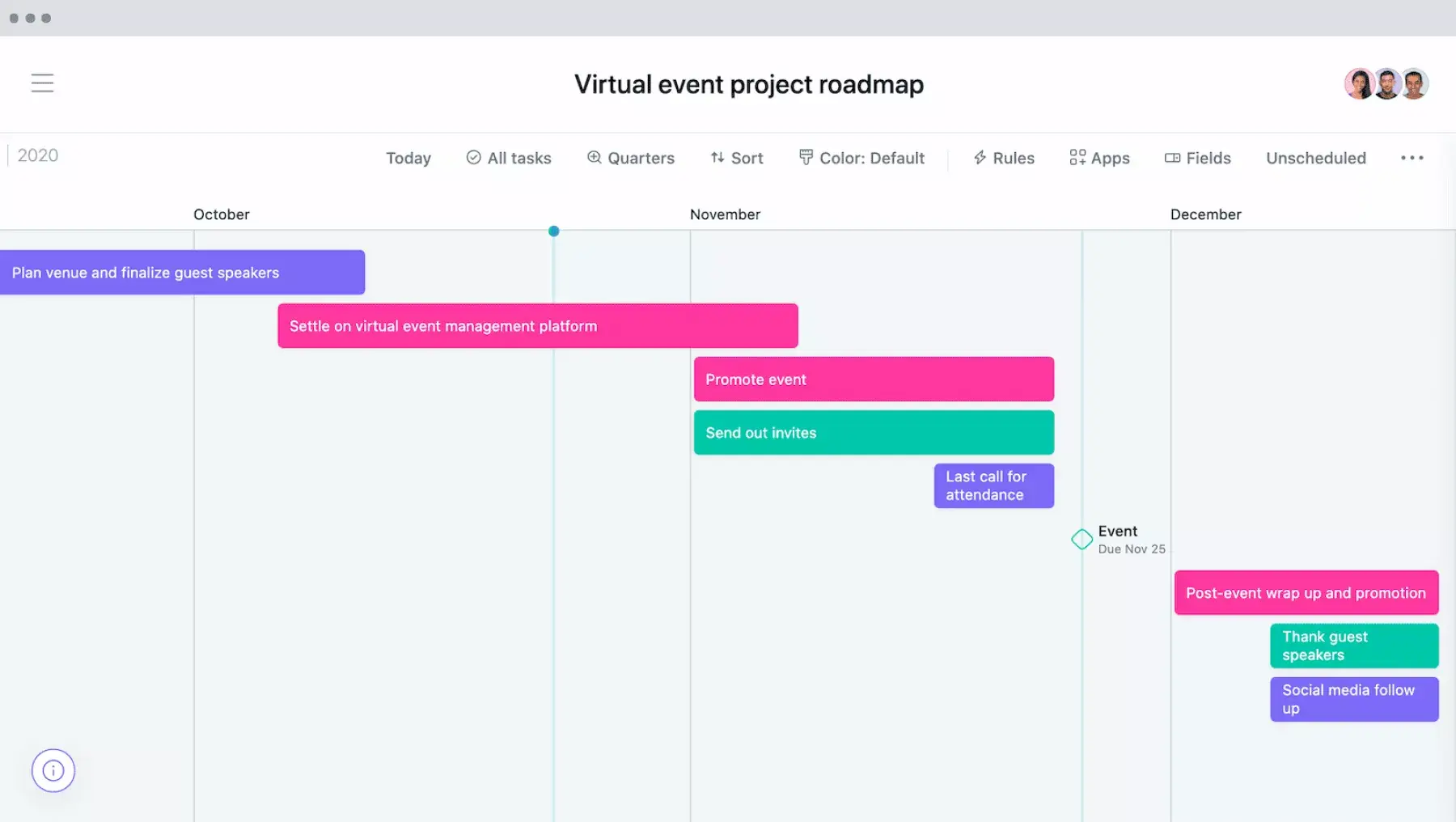
A virtual event roadmap outlines how content planning, speaker preparation, registration, and promotion progress toward the event. Use it to highlight key milestones, including session topic approval, registration launch, and completion of speaker rehearsals.
Presenting these phases together helps stakeholders assess timing and identify handoffs that may impact the event date. Maintain individual production tasks in the project plan to keep the roadmap focused as an overview.
Project roadmap example for an IT team
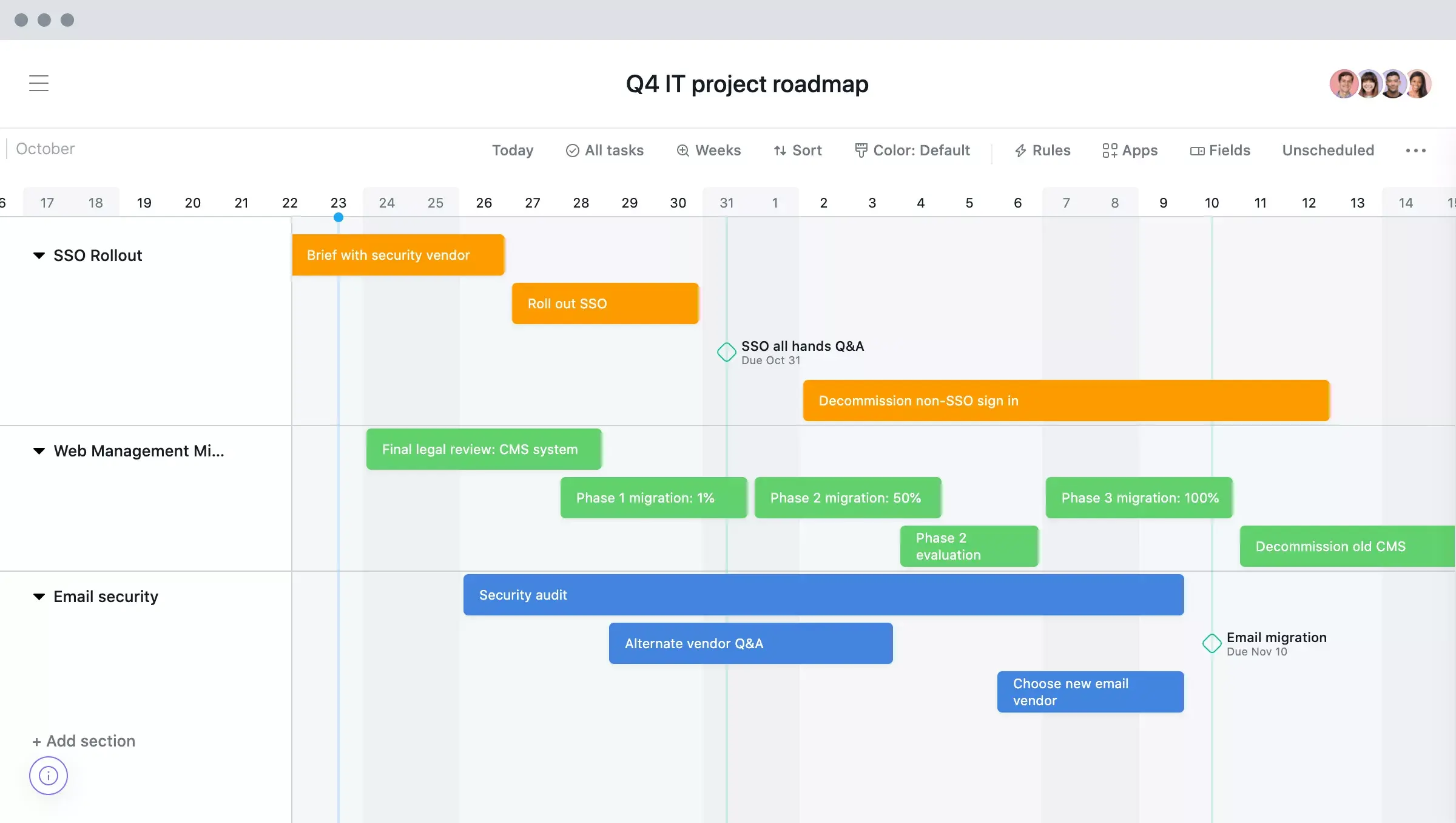
An IT team roadmap can display related initiatives in separate swimlanes, each with distinct goals, milestones, and schedules. Viewing them together enables the team to identify overlapping deadlines, shared responsibilities, and interdependent work.
Read: Create a better project plan in just 7 stepsThis provides a broader team or program perspective on related projects. Use Asana’s program roadmap template to organize projects, milestones, timelines, and dependencies.
Project roadmap best practices
Keep your roadmap useful after kickoff by agreeing on how the team will maintain it. Start with these three practices:
Keep detail at the phase and milestone level. Link to delivery tasks so stakeholders can examine the work without filling the overview with every activity.
Confirm owners and handoffs before committing to dates. Ask those responsible for the work to verify timing, including any required approvals or vendor input.
Review changes before adding them to the roadmap. Assess how a new request affects the objective, existing commitments, dependencies, and team capacity. Agree on a review cadence and revisit the plan when conditions change.
Morningstar’s Retirement team demonstrates this review process in practice. Its centralized Asana intake process uses AI Studio to identify missing information and generate standardized request summaries. The product team scores complex requests on business value, complexity, and cost, then decides whether to approve, defer, or reject them.
This approach separates information gathering from making a commitment. For your own roadmap, provide enough context for the team to evaluate a request before changing the plan.
Read Morningstar’s case study →
Project roadmap vs. project plan, product roadmap, and Gantt chart
A roadmap and a project plan are living documents that teams update as work evolves. They serve different planning needs, while a Gantt chart visualizes the work. Use these distinctions to select what your audience requires:
Item | Purpose | When to use it |
A high-level view of a project’s objective, major deliverables, milestones, and timing. | Use it to agree on major commitments and communicate the project’s direction. | |
The details of how the team will deliver the project, including tasks, responsibilities, budget, and success metrics. | Use it to organize and manage day-to-day delivery. | |
Product direction and priorities over time. | Use it (and product roadmap software) to communicate which product problems, improvements, or releases the team plans to address. | |
A timeline visualization using horizontal bars to show work over time and the relationships between tasks. | Use it to display a roadmap or a detailed project schedule, depending on the level of detail. |
Build a project roadmap for your team
With an effective project roadmap, your team can see where the project is going, how the major phases connect, and who is responsible for each commitment. Agree on the objective, milestones, owners, and review process, then map the work in Asana project views.
Map project timelines with AsanaFAQs about using project roadmaps
The project lead typically coordinates the roadmap with contributors and stakeholders. One person should maintain dates and record agreed changes, while those responsible for delivery confirm their commitments. Involve any approvers or external partners whose input affects milestones so the roadmap reflects the work the team can deliver.
Update a project roadmap according to an agreed review schedule and whenever a milestone, dependency, scope, or priority changes. Short event projects may require weekly reviews, while longer initiatives may use a different cadence. Review significant delays or new requests as they arise so owners can assess their impact on existing commitments.
Yes, a project roadmap can change as the team learns more or priorities shift. Before revising it, assess the impact on scope, dates, dependencies, and resources. Confirm decisions with affected owners and approvers, then communicate updated commitments and the next review date. Keep a record of changes and the reasons for them.
Yes, a spreadsheet can be used for a simple project roadmap. Include major phases or deliverables, owners, start and end dates, milestones, and dependencies. Agree on who maintains the file and how changes are communicated. If multiple teams need frequent updates or linked task dependencies, consider a shared work-management tool.
Not every project requires a separate roadmap. For small projects, such as a monthly blog calendar or a low-priority bug-fixing initiative, a shared task list may suffice. Keep project information centralized and check in with stakeholders. A roadmap is most useful when multiple teams, milestones, or handoffs require coordination.