Cara Asana menggunakan manajemen kerja untuk mendukung perencanaan peta jalan digital


85% perusahaan Fortune 100 memilih Asana¹






Pemetaan jalan digital bukan sekadar membuat Daftar tugas untuk proyek—ini tentang membuat pilihan cerdas yang mendorong hasil nyata. Peta jalan yang jelas dan diprioritaskan dengan baik memerlukan penyelarasan dengan pemangku kepentingan, penetapan prioritas yang jelas, dan pengambilan keputusan sulit. Dani Spires, Kepala Bagian Digital di Asana, memahami tantangan ini secara terperinci.
“Sebagai Tim digital, kami harus mendukung kebutuhan bisnis yang terus berkembang, sekaligus mendorong inisiatif teknis untuk terus maju. Perencanaan peta jalan membantu kami menemukan keseimbangan yang tepat,” ujarnya.
Untuk mencapai hal ini, Tim Dani secara rutin menilai kembali prioritas mereka dan memasukkan umpan balik dari seluruh organisasi agar peta jalan mereka tetap selaras dengan gol strategis. Hal ini tidak mudah—terutama saat bekerja dengan banyak pemangku kepentingan. Di situlah peran Asana.
Empat cara Asana menyederhanakan perencanaan peta jalan
Jika dilakukan dengan benar, pemetaan roadmap digital membantu Tim memprioritaskan proyek yang paling berdampak, menyiapkan langkah awal untuk pertumbuhan, dan menjaga agar semua orang tetap fokus pada hal yang penting. Seperti yang dikatakan Dani, gol utamanya adalah “mengetahui prioritas Tim dan menentukan cara kami dapat mengalokasikan kapasitas untuk mendorong dampak sembari tetap fokus pada inisiatif lain.”
Untuk mewujudkannya, Tim membutuhkan ruang terpusat untuk melihat proyek potensial, menyelaraskan strategi, membuat keputusan, dan melacak progres—semuanya sambil berkolaborasi dengan mulus.
Berikut cara Asana membantu Tim Dani menyelesaikannya.
Memusatkan pekerjaan peta jalan untuk visibilitas
Salah satu tantangan terbesar dalam membuat peta jalan digital adalah memastikan mitra lintas fungsi terus mendapatkan informasi terkini selama proses berlangsung. Menurut Dani, daftar pemangku kepentingan Tim digital “panjang dan luas”—melibatkan banyak orang dengan prioritas dan tanggung jawab yang berbeda, yang perlu memberikan masukan untuk pengambilan keputusan yang akurat. Artinya, terus memberi informasi kepada semua orang merupakan tantangan.
Untuk mengatasi hal ini, Tim Dani mengandalkan fitur proyek Asana untuk membuat proyek peta jalan induk yang menyatukan semua inisiatif digital untuk tahun fiskal tersebut. Di awal proses pembuatan peta jalan, pemangku kepentingan dan Tim menambahkan usulan proyek mereka ke peta jalan induk sebagai Tugas Asana, sehingga semua orang mendapatkan visibilitas dan kesempatan untuk memberikan masukan.
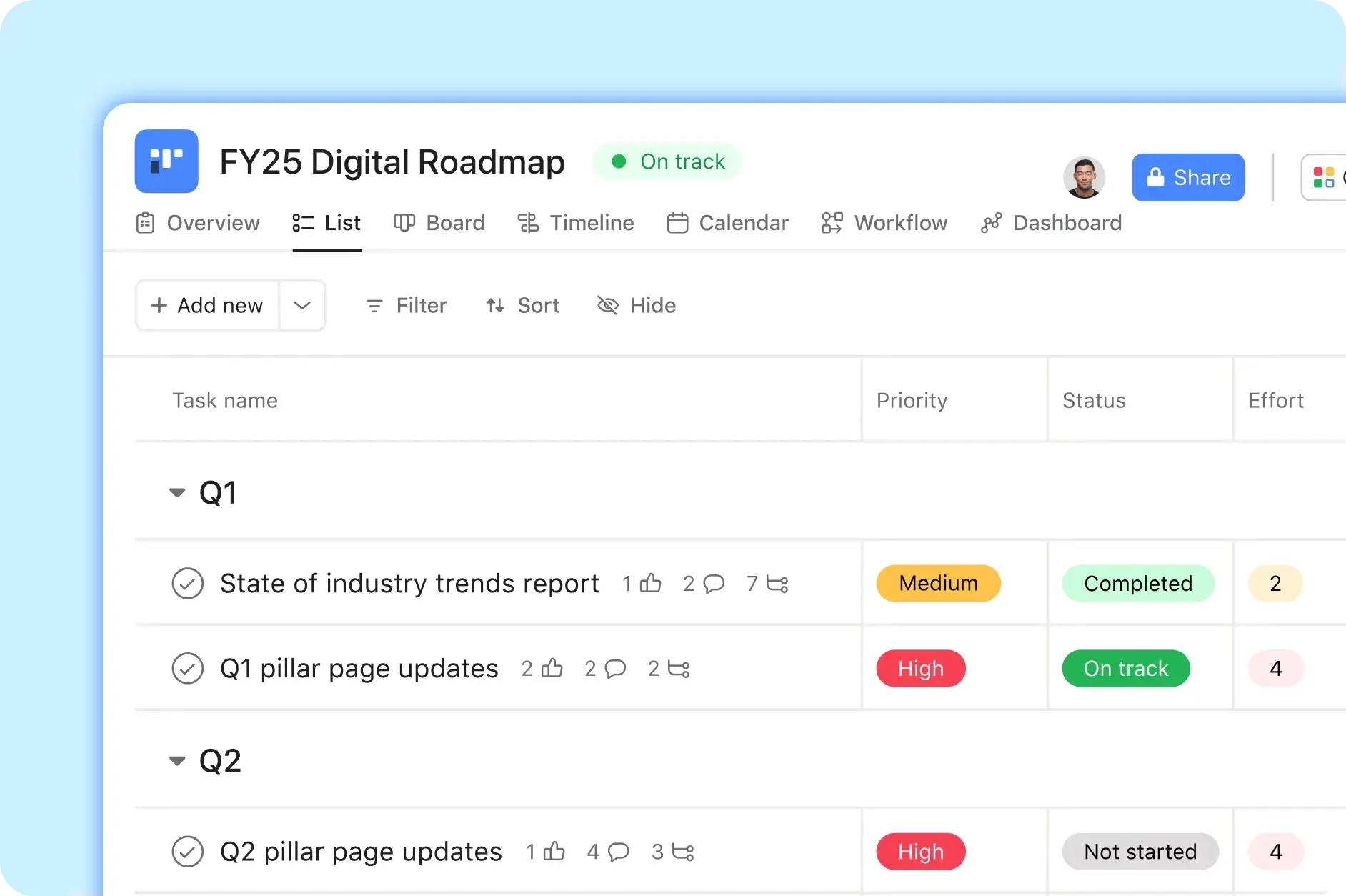
Contohnya, misalnya, Tim SEO berencana untuk memperbarui empat halaman pilar di Asana.com pada kuartal pertama. Untuk mencapai gol mereka, mereka memerlukan dukungan digital untuk mendesain ulang tata letak halaman, mengunggah konten baru, dan mengirim pembaruan secara langsung. Selama proses pembuatan peta jalan awal, Manajer proyek SEO menambahkan Tugas ke peta jalan digital yang sesuai dengan proyek SEO, misalnya, “Pembaruan Halaman Pilar Kuartal 1.” Kemudian, Tim digital meninjau Tugas tersebut langsung di peta jalan dan menggunakan informasi yang diberikan untuk memutuskan apakah akan melanjutkan proyek atau tidak.
“Dengan membuat rencana terpusat di satu tempat, kami dapat memberikan visibilitas dan suara kepada semua mitra kami dalam proses ini,” kata Dani.
Membuat keputusan sumber daya berdasarkan data
Setelah Tim Dani membuat proyek peta jalan digital mereka, langkah berikutnya adalah memutuskan proyek mana yang akan masuk ke tahap akhir.
Namun, ini bukan hanya tentang memilih pekerjaan yang harus dilakukan. Dengan begitu banyak pemangku kepentingan yang terlibat, permintaan dapat dengan cepat membuat peta jalan melampaui kapasitas. Seperti yang disebutkan Dani, ada keseimbangan yang rumit antara memprioritaskan inisiatif yang penting bagi bisnis—seperti proyek yang mendorong prospek penjualan atau pipeline—dan pekerjaan teknis strategis yang diperlukan untuk mendukung pertumbuhan jangka panjang.
Untuk mengambil keputusan ini, Tim Dani mengandalkan Bidang kustom Asana. Setiap kali pemohon menambahkan proyek yang diusulkan ke peta jalan, mereka menandai Tugas dengan Bidang kustom yang dirancang untuk membantu Tim memahami bagaimana proyek tersebut sesuai dengan gambaran umum—dan memutuskan apakah mereka harus menerimanya atau tidak. Bidang kustom ini mencakup:
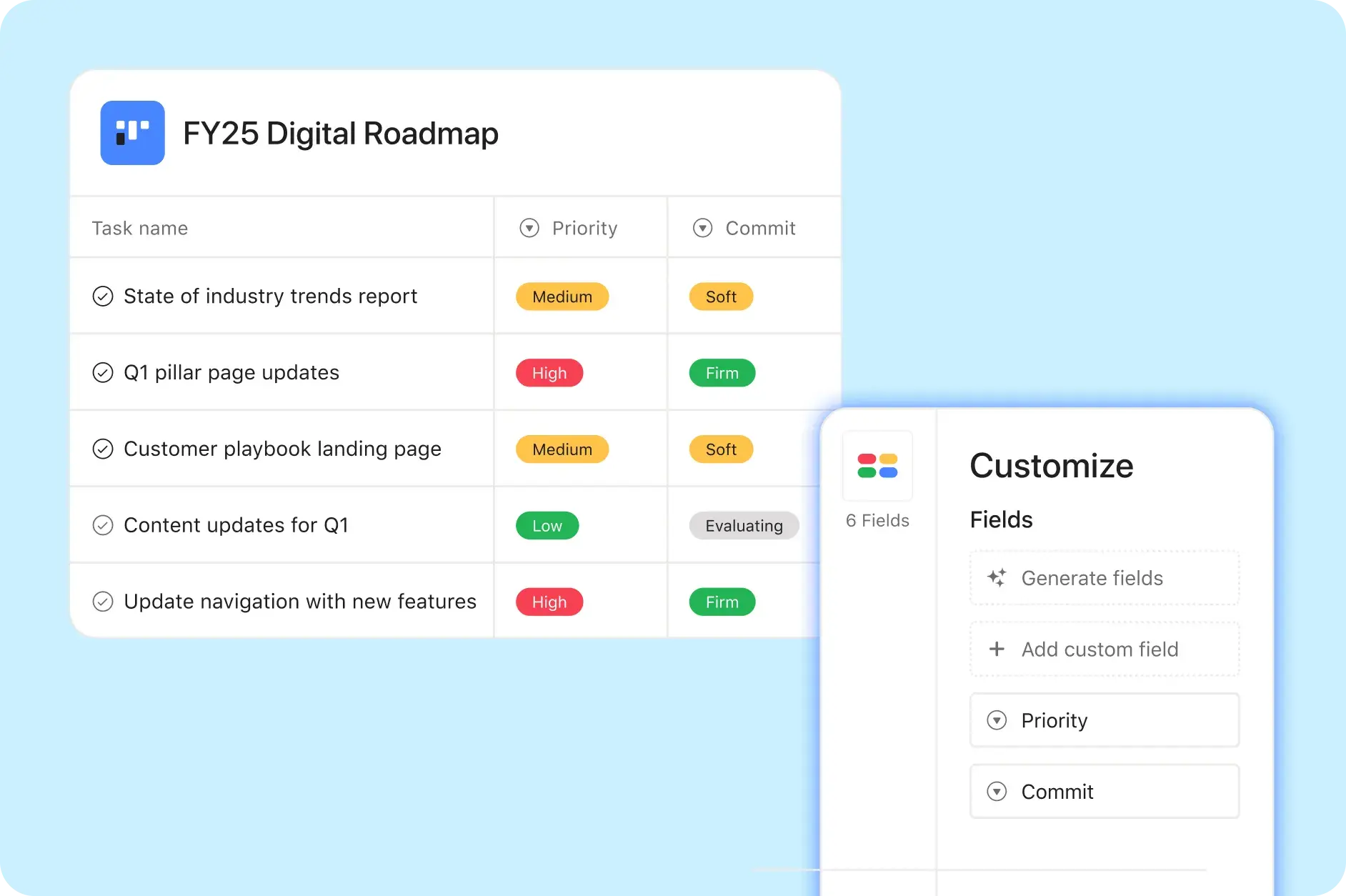
Kuartal penyerahan: Kuartal penyerahan yang direncanakan saat pekerjaan harus selesai.
Komitmen: Apakah proyek telah mendapatkan komitmen dan tingkat komitmennya.
Prioritas: Tingkat prioritas Tugas atau proyek.
Tim yang bertanggung jawab langsung: Tim digital mana yang akan bertanggung jawab atas proyek tersebut.
Upaya: Perkiraan numerik dari 1–5 yang menunjukkan tingkat kompleksitas proyek.
Kiat Asana
Setelah proyek ditambahkan dan diberi tag, Tim digital menilai beban kerjanya dan memutuskan cara mengalokasikan kapasitas untuk berbagai jenis proyek—seperti inisiatif strategis, pemeliharaan teknis, dan dukungan pemangku kepentingan. Dengan melihat Bidang Kustom secara singkat, pemimpin pilar digital dapat dengan mudah menyelaraskan prioritas, Upaya yang diperlukan, dan potensi dampak setiap proyek, sehingga lebih mudah untuk menyelesaikan peta jalan.
“Bidang kustom kami memungkinkan kami melakukan percakapan mendalam tentang kapasitas,” kata Dani. “Kami dapat menunjukkan kepada pemangku kepentingan apa yang telah diminta, apa yang telah dijanjikan, dan tingkat upaya yang diperlukan—lalu menggunakan informasi tersebut sebagai dasar untuk percakapan mengenai kompromi.”
Bidang kustom ini juga membantu Tim Dani melihat keselarasan setiap proyek dengan gol inti Asana. Dengan menandai Tugas dengan gol perusahaan tingkat tinggi yang terkait dengannya, Tim dapat merasa yakin bahwa pekerjaan yang mereka kerjakan mendukung tujuan strategis.
“Dengan Asana, semuanya terhubung,” kata Dani. “Kami dapat melihat dengan jelas bagaimana prioritas kami terkait dengan gol pemasaran—dan pada akhirnya, dengan tujuan bisnis inti.”
Lihat cara kerja perencanaan pemasaran
Dengan Asana, tim pemasaran dapat menghubungkan pekerjaan, menstandarkan proses, dan mengotomatiskan alur kerja—semuanya di satu tempat.
Menghubungkan pekerjaan ke berbagai Tim
Meskipun peta jalan digital merupakan sumber informasi utama untuk proyek-proyek Tim Digital, proyek ini bukan satu-satunya proyek yang sedang berjalan. Tim yang berbeda bekerja berdasarkan beberapa peta jalan yang tumpang tindih—seperti pemasaran, pengembangan produk, atau pengalaman pelanggan. Tumpang tindih ini dapat dengan mudah mengakibatkan duplikasi Upaya dan pemborosan sumber daya.
Untuk mencegah hal ini, Tim Dani menggunakan fitur Asana untuk melakukan multi-home, yang memungkinkan satu Tugas berada di beberapa proyek. Misalnya, proyek halaman pilar kuartal 1 tim SEO dapat diposting silang ke peta jalan SEO, peta jalan pemasaran konten, dan Papan sprint pengembangan web, sehingga semua orang tetap selaras dan Tugas yang sama tidak dilakukan berulang.
“Peta jalan digital sangat besar dan mencakup begitu banyak fungsi, sehingga Tugas mudah terabaikan,” kata Dani. “Dengan melakukan multi-home, mitra utama kami dapat mengambil proyek digital dan memasukkannya ke dalam peta jalan mereka. Dengan begitu, kami dapat menjaga semuanya tetap terhubung tanpa membuat duplikat pekerjaan.”
Membuat pekerjaan selalu sesuai rencana dengan pelaporan real-time
Setelah peta jalan ditetapkan dan pekerjaan dimulai, Tim Dani menggunakan Dasbor pelaporan Asana untuk melacak progres. Dasbor memberikan tampilan umum tentang status proyek, sehingga membantu Tim dengan cepat mengatasi masalah dan mencegah Kemacetan.
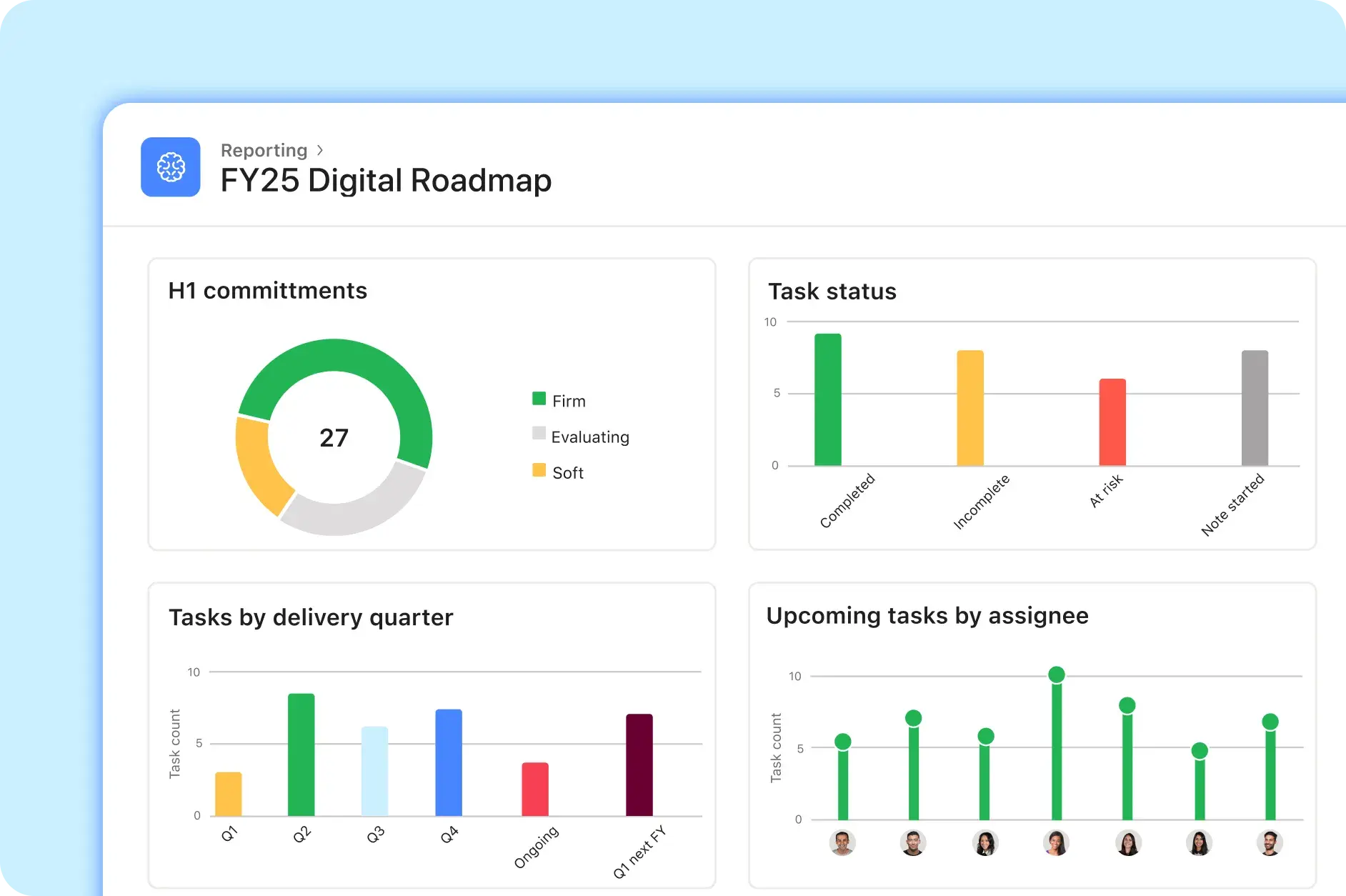
“Kami menggunakan fitur Dasbor untuk terus memantau progres kami—posisi kami dalam hal pencapaian Gol perusahaan,” kata Dani. “Semua orang dapat dengan mudah melihat apa yang menjadi prioritas utama, apa yang terhambat, dan apa yang melebihi kapasitas.”
Pada akhir setiap kuartal, Tim digital meninjau kembali peta jalan mereka dan menyesuaikannya dengan prioritas bisnis baru. Jika ada perubahan yang memerlukan pergeseran fokus, hal tersebut dibahas selama diskusi triwulanan, saat Tim memutuskan proyek mana yang akan dilanjutkan. Peta jalan yang diperbarui kemudian dibagikan kepada pemangku kepentingan agar semua orang selalu selaras dengan perubahan.
Bahkan setelah satu kuartal berakhir, pekerjaan Tim tetap berlanjut. Mereka menggunakan metrik Dasbor untuk mengidentifikasi keberhasilan dan tantangan, lalu menerapkan pembelajaran ini pada perencanaan mendatang.
“Dengan melacak tanggal mulai dan akhir peta jalan kami, kami dapat melihat jumlah proyek yang direncanakan dan selesai dalam jangka waktu yang ditetapkan,” kata Dani. “Kemudian, kami dapat menggunakan data itu untuk mendapatkan gambaran yang jelas tentang progres kami dari tahun ke tahun.”
Jaga agar peta jalan digital Anda tetap sesuai rencana
Peta jalan digital yang dikelola dengan baik tidak harus rumit. Dengan Asana, Tim Anda dapat menyelaraskan prioritas, menyederhanakan kolaborasi lintas fungsi, dan membuat keputusan berdasarkan data yang mendukung gol strategis organisasi Anda—menciptakan landasan untuk hasil yang berarti.
Lihat cara kerja perencanaan pemasaran
Dengan Asana, tim pemasaran dapat menghubungkan pekerjaan, menstandarkan proses, dan mengotomatiskan alur kerja—semuanya di satu tempat.