How to make tough choices with a decision matrix


85% firm z listy Fortune 100 wybiera Asanę¹






Summary
Decision-making is a critical part of good business planning, but it can be tricky to know which option is right. The key is to decide quickly without rushing and choose the right option without losing momentum.
If this sounds like an impossible conundrum, don't worry; it isn't. With a decision matrix, you can quickly weigh the pros and cons of each option, consider different variables, and make a good decision easily. In this guide, you'll learn what a decision matrix is, explore different types, discover when to use one, and follow a step-by-step process to create your own.
What is a decision matrix?
A decision matrix is a table that compares options against a shared set of criteria, such as cost, quality, or risk. You score each option on the same scale, then add the scores to compare the alternatives. In a weighted decision matrix, you give more important criteria greater influence on the total.
Also known as a decision-making matrix or decision grid, this tool clarifies your reasoning. Weights are optional; an unweighted matrix treats all criteria equally. In both cases, results depend on your chosen criteria, evidence, and ratings.
Decision matrix template
Copy these tables into a spreadsheet or document to create your own decision matrix. Replace the bracketed fields with your specific criteria and options. For a complete example, refer to the seven-step guide below.
Before scoring, record:
Decision to make: [What are you choosing?]
Decision owner: [Who will make the final call?]
Decision deadline: [When is the choice due?]
Hard requirements: [What must every option satisfy?]
Eligible options: [Which options meet those requirements?]
Agreed scoring scale: [What do ratings 1–5 mean for each criterion?]
Criterion | Weight | Option A score | Option B score | Option C score |
[Criterion 1] | [Weight] | [1–5] | [1–5] | [1–5] |
[Criterion 2] | [Weight] | [1–5] | [1–5] | [1–5] |
[Criterion 3] | [Weight] | [1–5] | [1–5] | [1–5] |
[Criterion 4] | [Weight] | [1–5] | [1–5] | [1–5] |
Weighted total | — | [Calculate] | [Calculate] | [Calculate] |
In Excel or Google Sheets, paste the scoring table with its header in A1. Enter numeric weights in B2:B5 and Option A ratings in C2:C5. Enter =SUMPRODUCT($B$2:$B$5,C2:C5) in C6, then copy the formula across to E6 to calculate the other totals. The dollar signs keep the weight range fixed.
Complete all ratings before comparing totals. Do not treat missing ratings as zero. For an unweighted decision matrix, enter 1 for each weight. If you add criteria, update the formula ranges accordingly.
Use the second table to document supporting evidence, your decision, and subsequent actions.
Review field | Fill in |
Evidence behind each rating | [Option, criterion, source, and reviewer] |
Result and sensitivity check | [Leading score, runner-up, and what changes the result] |
Decision and rationale | [Selected option, trade-offs, and unresolved conditions] |
Follow-up owner and due date | [Name, task, and date] |
A sensitivity check evaluates whether a reasonable change to a weight or rating changes the result. Keep your original assumptions to explain both the initial ranking and the final decision.
Types of decision matrices
Decision matrices vary in complexity. Depending on your needs, you may choose a simple comparison or a detailed weighted analysis. Common types include:
Matrix type | How it works | Best for |
Simple decision matrix | Rate each option against the criteria and add up the scores; no weighting is involved. | Straightforward decisions where all factors carry equal importance |
Weighted decision matrix | Assign importance levels to criteria, then multiply each criterion's score by its weight before totaling. | Decisions where factors such as affordability and quality carry different importance |
Pugh matrix | Compare options against a baseline using +, 0, or - ratings instead of absolute scores. | Evaluating design alternatives or iterating on an existing solution |
When to use a decision matrix
Use a decision matrix when you have multiple options to evaluate using the same criteria. It is effective for comparing vendors, selecting software, or choosing a project proposal.
For example, Joe Moran’s team at the Michael J. Fox Foundation used a decision matrix to evaluate work management platforms. Their criteria included effort tracking, timelines, dependencies, and custom fields. They selected Asana to help manage projects across its marketing and communications departments.
If you can't evaluate your options using the same criteria, a decision matrix may not be appropriate. Consider a decision tree analysis for sequential or branching decisions.
Use a decision matrix if you are:
Comparing multiple, similar options
Narrowing down various options into one final decision
Weighing a variety of important factors
Hoping to approach the decision from a logical viewpoint, instead of an emotional or intuitive one
If a decision matrix does not fit your current situation, consider the alternative decision-making approaches described below.
Read: Priority matrix: How to identify what matters and get more doneBenefits of using a decision matrix
A decision matrix gives your team a shared basis for discussing a choice. It can help you:
Apply agreed-upon criteria consistently. Evaluate each option using the same factors rather than adjusting criteria to favor a particular choice.
Create transparency. Identify where each option excels and understand the trade-offs involved in your selection.
Facilitate discussion. When team members disagree on a rating, review the supporting evidence together.
Document your reasoning. Keep a record of the criteria, ratings, and assumptions behind the decision.
Organize complex comparisons. Ensure consistent information is available for each option to reduce reliance on memory.
A decision matrix does not eliminate bias or guarantee the optimal choice. Its value lies in making your judgments transparent and allowing you to review and improve them.
How to create a decision matrix in 7 steps

Follow these seven steps to create a weighted decision matrix. This example features a marketing team selecting a design agency for campaign visuals and video.
Utwórz własny szablon1. Identify your alternatives
Decision matrices help you select the best option from a set of similar choices. Before you can build your matrix, identify the options you're choosing between.
Imagine your team is launching a new brand campaign. Jordan Lee, the marketing lead, needs to select an agency by Wednesday so they can begin contracting. The shortlist contains Agency 1, Agency 2, and Agency 3.
All three agencies can meet the campaign deadline and budget, making them eligible for comparison, even if costs vary. Agencies that do not meet these requirements should be excluded before scoring.
2. Identify important considerations
Choose criteria that reflect the problem you need to solve. When Hudl evaluated work management tools, its marketing team wanted a shared view of work, real-time visibility into team resources, and progress reporting. Each criterion addressed a difficulty the team was already experiencing.
For the agency comparison, the team selected cost, experience, communication, and customer reviews as criteria. Define cost as affordability, so a higher score indicates a more affordable option.
Agree on the evidence you’ll use for each rating. Use quotes for cost, relevant portfolio examples for experience, response expectations for communication, and customer references for reviews. Avoid duplicating similar strengths under different criteria.
3. Create your decision matrix
Create a grid with one option for each row and a criterion for each column, as shown below. You can also put criteria in rows and options in columns, as in the decision matrix template above. Keep budget and deadline eligibility separate from the scores.
Przeczytaj: Wprowadzenie do zarządzania pracąIn Asana, each task can represent an agency, and numeric custom fields can hold its ratings. Here’s the empty matrix for the team’s three agencies and four criteria:
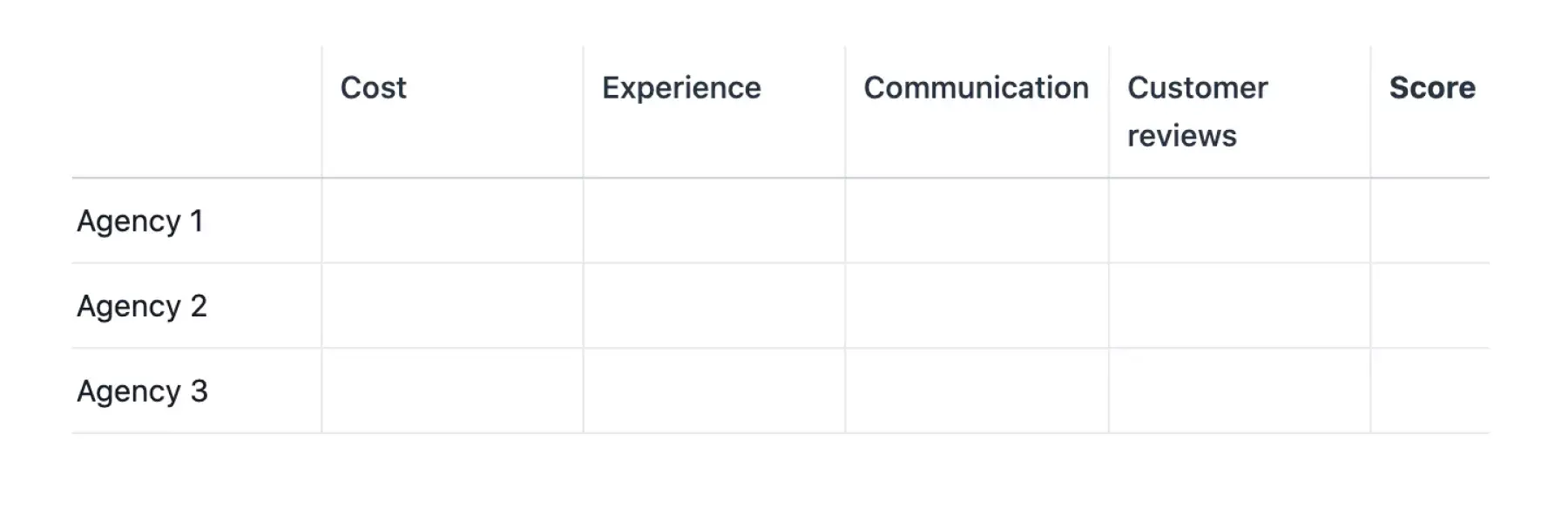
If your team needs to compare features, pricing, or vendor options side by side, use a comparison chart template as a starting point before developing a full decision matrix.
4. Add weight
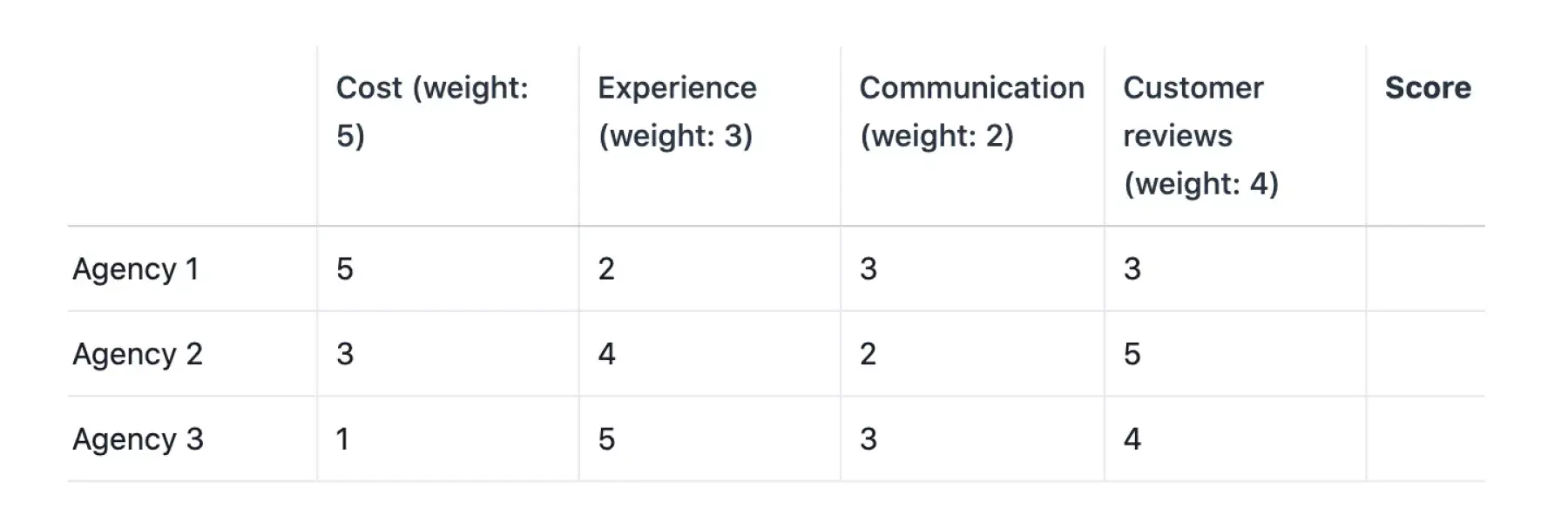
Assign weights before reviewing scores so the importance of each criterion doesn't depend on which option you prefer. In this example, affordability matters most, followed by customer reviews, experience, and communication.
Use the following relative weights: cost 5, experience 3, communication 2, and customer reviews 4. The total does not need to equal 10. Document the rationale for each weight and retain the original values if you later test different priorities.
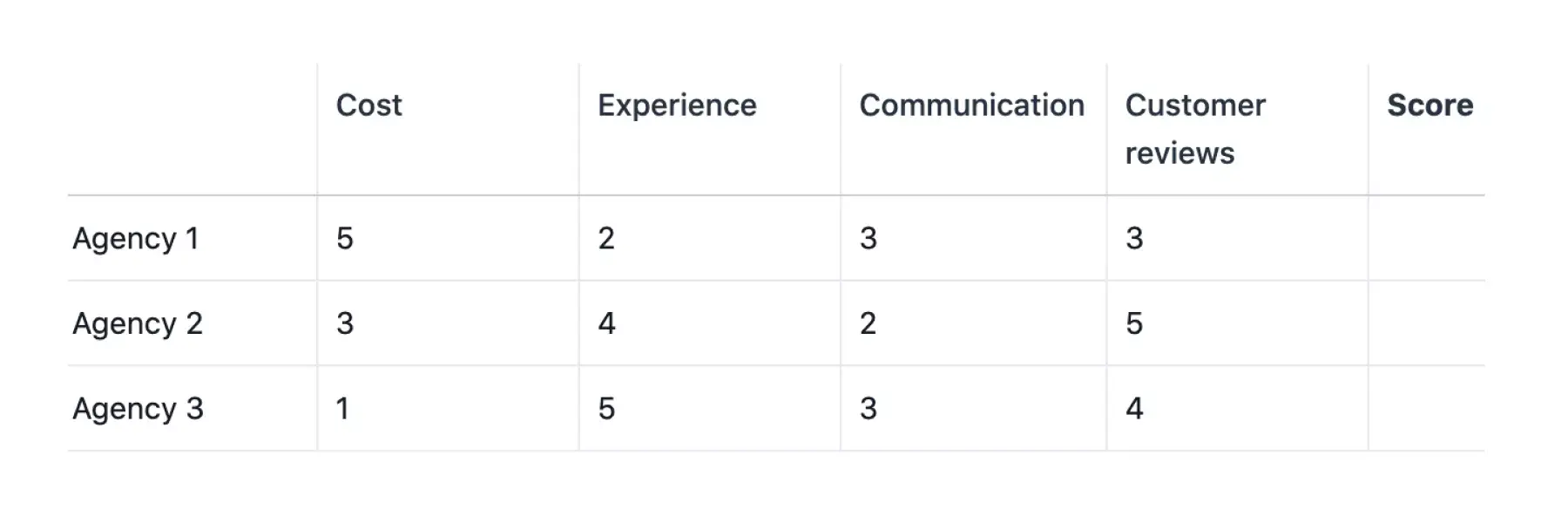
The decision matrix example shows the agreed weights beside each criterion. The next step explains how to assign the ratings shown alongside them.
5. Fill in your decision matrix
Rate each agency on a 1–5 scale, with 5 always indicating the best outcome. Define the meaning of each rating for every criterion before completing the matrix. For example, a cost rating of 5 represents the most affordable eligible option, while a communication rating of 5 indicates prompt, consistent replies.
Attach supporting evidence, such as quotes, portfolio examples, or reference notes, to each rating. If information is missing, leave the rating incomplete and assign someone to verify it before calculating final totals.
The team’s initial assessment of the agencies looks like this:
Agency 1: Cost-effective, but limited experience. Average communication and reviews.
Agency 2: Mid-range cost with solid experience and great reviews, though communication has been lacking.
Agency 3: Most expensive with the most experience. Average communication and good reviews.
Using the agreed scale, the team assigns these ratings:
Make sure a high score consistently represents a better outcome. In Asana’s Meeting Reset experiment, 60 Marketing participants rated recurring meetings for effort and value on separate three-point scales. Since high value and high effort have different implications, combining these raw ratings would distort results by treating effort as a benefit.
The meeting reset saved participants 265 hours per month, with 70% of the savings resulting from changes other than cancellations, such as restructuring meetings. This example also suggests considering whether a weak score can be improved before rejecting an option
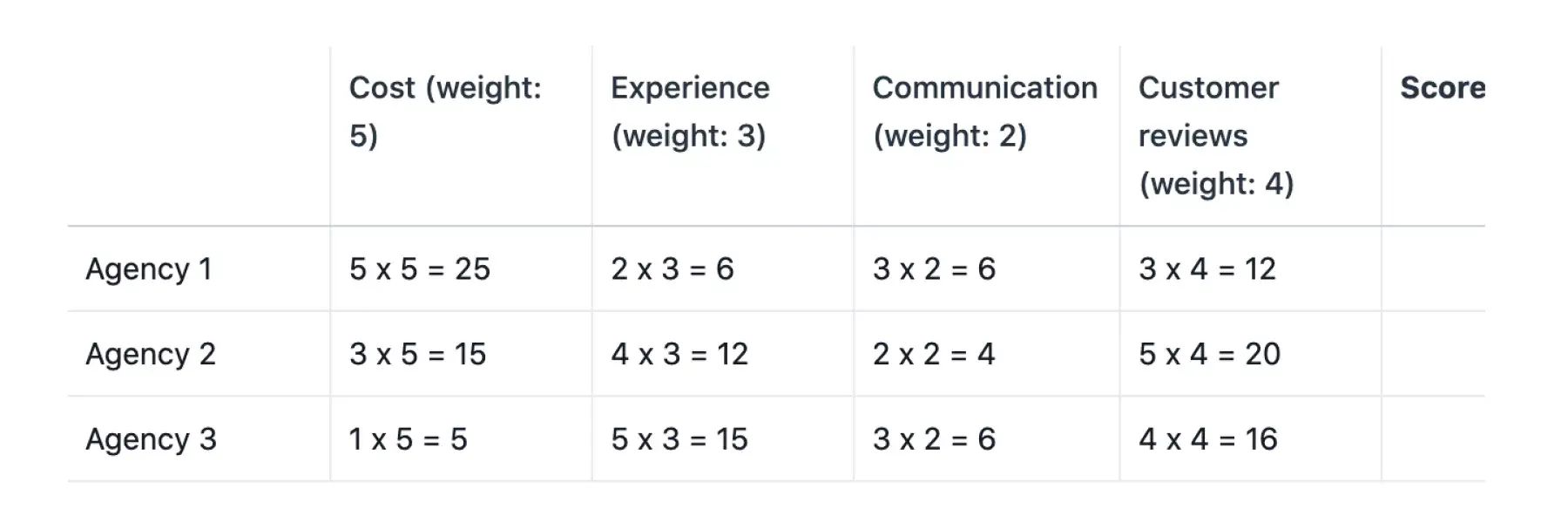
Here’s how the agency ratings appear in the matrix:
6. Multiply scores by weights
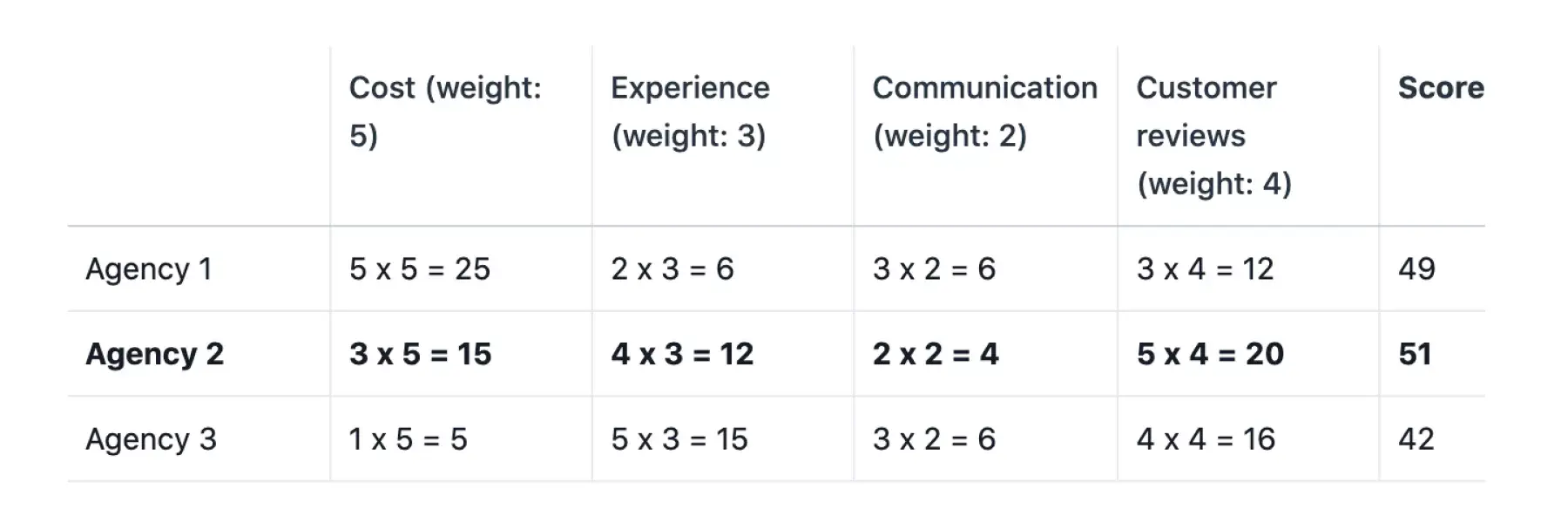
Multiply each rating by its criterion’s weight. For Agency 2’s customer reviews, the rating is 5, and the weight is 4, so the weighted score is 5 × 4 = 20. Repeat the calculation for every criterion and agency.
The total is the sum of those weighted scores. You can calculate it with the spreadsheet formula in the decision matrix template, or use Asana formula custom fields on an eligible plan.
To continue our example, here's what it looks like when you apply the weighted scores to each consideration for each agency:
7. Calculate totals and review close results
Add each agency’s weighted scores. Agency 1 totals 25 + 6 + 6 + 12 = 49. Agency 2 totals 15 + 12 + 4 + 20 = 51. Agency 3 totals 5 + 15 + 6 + 16 = 42.
For example, this is what the finished decision matrix looks like:
Agency 2 leads by two points, but its communication rating is only 2 out of 5. Before making a final decision, the team assesses how much the outcome depends on this trade-off. If the communication weight increases to 4, with all other weights and ratings unchanged, Agency 1 and Agency 2 tie.
Assumption | Agency 1 | Agency 2 | Agency 3 |
Original weights: 5 / 3 / 2 / 4 | 49 | 51 | 42 |
Communication weight 4; other weights unchanged | 55 | 55 | 48 |
This sensitivity check prompts the team to revisit communication before finalizing the contract. Maya Chen is responsible for following up by checking Agency 2’s escalation contact and response expectations. Jordan retains the original weights and documents the review outcome.
In this example, Maya confirms that Agency 2 meets the team’s communication requirements. Jordan selects Agency 2 using the original weights, documents the trade-off, and assigns the contracting follow-up. If the check had failed, the team would have reconsidered the decision.
For your own matrix, document any agreed changes to criteria or weights. In the event of a tie, gather additional evidence or agree on a tiebreaker that aligns with the decision’s purpose. Do not adjust weights solely to achieve a preferred outcome.
Decision matrix example
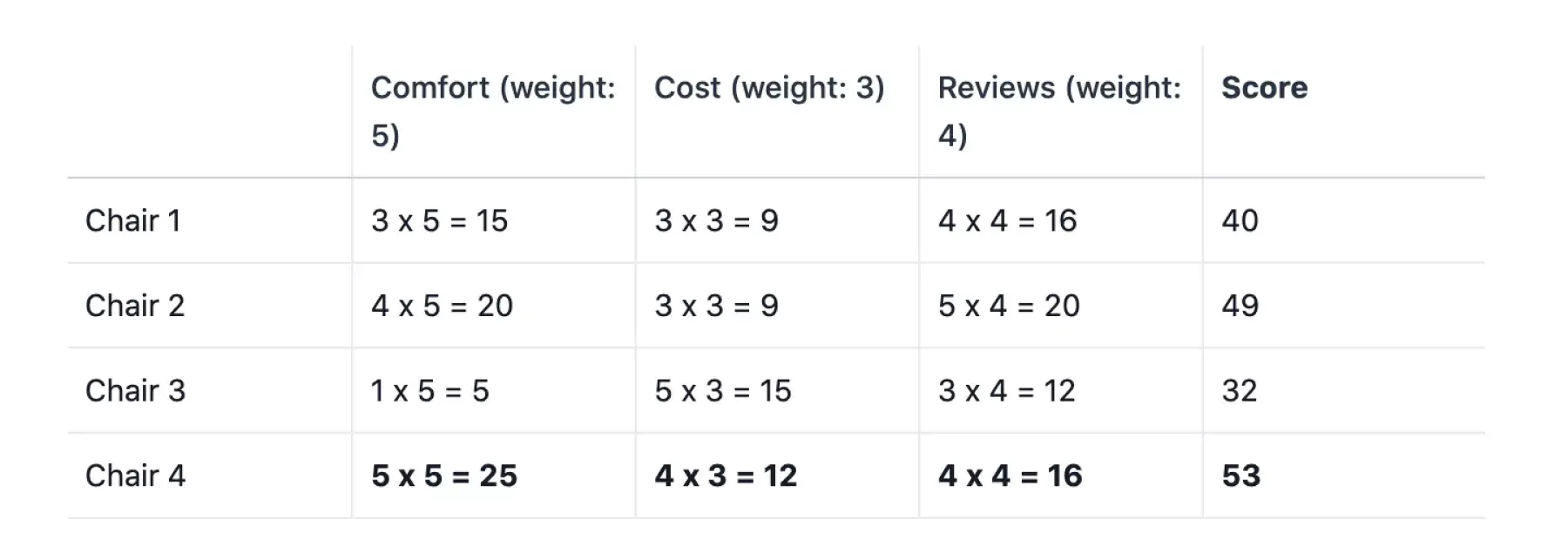
Decision matrices are also useful for personal decisions. For example, you can compare four chairs for your home office using comfort, cost, and customer reviews as criteria. In this case, a higher cost rating indicates greater affordability.
Option | Comfort (weight: 5) | Cost (weight: 3) | Reviews (weight: 4) | Score |
|---|---|---|---|---|
Chair 1 | 3 × 5 = 15 | 3 × 3 = 9 | 4 × 4 = 16 | 40 |
Chair 2 | 4 × 5 = 20 | 3 × 3 = 9 | 5 × 4 = 20 | 49 |
Chair 3 | 1 × 5 = 5 | 5 × 3 = 15 | 3 × 4 = 12 | 32 |
Chair 4 | 5 × 5 = 25 | 4 × 3 = 12 | 4 × 4 = 16 | 53 |
The weighted totals are 40, 49, 32, and 53, making Chair 4 the highest-scoring option. Before purchasing, confirm your essential requirements, such as adjustable height or compatibility with your desk.
Use your decision matrix in Asana
Start with Asana’s comparison chart template, then adapt it to your decision. Add your criteria, weights, rating scale, and review fields; the comparison chart is a starting point.
Create a separate task for each agency and assign someone to gather and verify its information.
Document the agreed weights, rating definitions, and mandatory requirements in the project overview.
Add numeric custom fields for the four ratings and the weighted total, along with a “Decision” status field that includes options such as “Needs review” and “Selected.”
Store quotes, portfolio links, and reference notes in task descriptions, attachments, and comments to ensure reviewers can verify the evidence supporting each score.
Coupa’s project management office uses a similar approach, linking scoring and review. Its Asana intake form collects details such as the business case, timing, involved teams, and alignment with organizational goals. The team uses these responses to generate a priority number and reviews the intake task before adding work to the roadmap.
Apply the same principle to your agency decision: keep the score, supporting information, reviewer, and next action together.
Decision-making alternatives
If you need to prioritize tasks, assign responsibilities, involve stakeholders, or generate ideas, consider decision-making alternatives. You can also use these approaches alongside a decision matrix.
Eisenhower matrix
An Eisenhower matrix is a grid that groups tasks by urgency and importance. Use it to decide what to do first, while a decision matrix helps you choose between options using shared criteria. Try our free Eisenhower matrix template.
RACI chart
A RACI chart identifies who is Responsible, Accountable, Consulted, and Informed for each task. Use it when you need to agree on who does the work and who participates in decisions, while a decision matrix evaluates the options themselves. Try our free RACI matrix template.
Stakeholder analysis map
A stakeholder analysis map groups individuals by their influence and interest in a project. Use it to plan who you need input from and who should receive updates, while a decision matrix compares the choices they will help assess. Try our free stakeholder register template to organize this information.
Team brainstorming session
A team brainstorming session brings people together to generate ideas for group decision-making. Use it to develop more options, then apply a decision matrix once alternatives are ready for comparison. Try our free team brainstorms template.
Make confident decisions
A decision matrix clarifies priorities and shows how each option compares. Bring your completed comparison into Asana so your team can review the evidence, record the final decision, and assign subsequent tasks.
Build your decision workflow in Asana by adapting the comparison chart template with your criteria, scores, and follow-up tasks. To begin your comparison, copy the decision matrix template above.
Utwórz własny szablonFrequently asked questions about decision matrices
An unweighted decision matrix gives every criterion equal importance and adds the ratings. A weighted matrix multiplies each rating by its criterion’s weight before totaling the scores. Weight criteria when some factors matter more than others, and use equal weights when they do not.
Using four to eight criteria is a practical starting point, though not mandatory. Select distinct factors that may influence your decision and can be evaluated for each option. Avoid double-counting similar factors, such as customer service and support responsiveness, unless you can clearly differentiate them.
Yes, decision matrices help you compare options such as apartments, laptops, or office chairs. Apply the same criteria and rating scale to each option, and eliminate choices that do not meet your essential requirements before scoring.
The 10-10-10 rule asks how you’ll feel about a decision in 10 minutes, 10 months, and 10 years. Use it to consider immediate reactions and longer-term consequences alongside your matrix. It is a reflection prompt; you still need to check the evidence and requirements behind your choice.
Yes, copy the scoring table into Excel or Google Sheets, placing the header in cell A1. Replace the labels and enter numeric weights and ratings. Use =SUMPRODUCT(B2:B5,C2:C5) in cell C6, then copy it across to E6. Maintain the review table separately and complete all ratings before comparing totals.